


Router reviews for 2026 cover 7 models from TP-Link, eero, GL.iNet, NETGEAR, and other leading brands, giving American shoppers a clear picture of what each device actually delivers in real homes. Our hands-on testing looks at real-world throughput, signal stability across multiple rooms, setup experience, and long-term reliability rather than just repeating spec-sheet numbers.
Whether you are upgrading a cramped apartment setup or wiring a large multi-story house for dozens of connected devices, this guide walks you through every meaningful difference between the models we evaluated. If you also game on a desktop rig, pairing a fast router with a capable graphics card and a low-latency monitor can dramatically improve your online experience.

Pros
- Excellent value for gigabit WiFi 6 performance at this price point
- Reliable TrueMesh technology effectively reduces dead zones throughout your home
- Integrated smart home hub eliminates the need for additional Zigbee or Thread devices
- Easy setup and management through the intuitive eero app
- Strong customer support available 7 days a week by phone or email
Cons
- Coverage limited to 1,500 sq ft - larger homes may need additional eero units to maintain performance
- Combining with older eero generations can reduce overall network performance
- Some advanced features require a separate eero Plus subscription
The eero 6+ represents a smart entry point for households seeking WiFi 6 performance without excessive expense. With support for gigabit internet speeds and the ability to connect 75+ devices simultaneously, this router handles the demands of modern families juggling work, streaming, and smart home devices. The 160 MHz bandwidth support provides the additional speed headroom needed when multiple family members are online at once, whether video conferencing, streaming 4K content, or online gaming.
What sets the eero 6+ apart is its patented TrueMesh technology, which actively manages network traffic to reduce the frustrating dead spots that plague many homes. Rather than simply broadcasting signal in all directions, TrueMesh intelligently routes data to maintain consistent performance throughout your coverage area. For those invested in smart home automation, the built-in Zigbee and Thread hub is a practical addition that consolidates connectivity without requiring separate hardware purchases.
Setup is refreshingly straightforward thanks to the guided mobile app, and the system improves over time through automatic security updates. The two gigabit Ethernet ports provide flexibility for wired connections to devices like gaming consoles or NAS systems. While a single unit covers up to 1,500 sq ft, larger homes may require additional eero devices to maintain optimal performance, and pairing with older eero models can impact network efficiency. For most households, however, the eero 6+ delivers reliable, fast WiFi at a genuinely competitive price.
| WiFi Standard | WiFi 6 (802.11ax) Dual-Band, AX3000 |
| Coverage Area | Up to 1,500 sq ft |
| Speed Rating | Supports ISP plans up to 1 Gigabit |
| Bandwidth | 160 MHz radio channel support |
| Connected Devices | 75+ devices simultaneously |
| Wired Connectivity | 2x Gigabit Ethernet ports (auto-sensing) |
| Processor | 1 GHz dual-core |
| RAM / Storage | 512 MB RAM / 4 GB flash storage |
| Smart Home Hub | Built-in Zigbee, Thread, Bluetooth 5.0 |
| Security Features | WPA3, WPA2, TLS v1.2+, VPN passthrough |
| Power Input | 100-240V AC, 50-60 Hz |
| Operating Temperature | 0°C to 40°C |
| Dimensions | 3.9 x 3.8 x 2.6 inches |
| Warranty | 1-year limited warranty |
| Setup Requirements | iOS or Android device, internet service |
Real-World Performance
The eero 6+ delivers consistent WiFi 6 performance across typical home environments. With 160 MHz bandwidth support, it handles simultaneous high-bandwidth activities without noticeable lag. Streaming 4K video, video conferencing, and gaming can happen concurrently without the network feeling strained. The dual-band configuration intelligently distributes devices between 2.4 GHz and 5 GHz bands for optimal efficiency.
Coverage and Range
A single unit adequately covers 1,500 sq ft of living space, though actual range varies based on building materials and layout. Dense walls or multiple floors may reduce effective coverage, which is where eero's expandability shines. Adding additional eero devices extends coverage seamlessly while maintaining TrueMesh optimization.
Network Stability
TrueMesh technology actively prevents the dead zones common in traditional routers. Rather than experiencing sudden dropoffs at the edges of coverage, most users report gradual, manageable signal degradation. The automatic channel selection and interference avoidance help maintain stability in congested WiFi environments.
Built-In Hub Advantage
The integrated Zigbee and Thread hub eliminates the need for separate smart home hubs. Compatible devices connect directly through your eero network, simplifying setup and reducing clutter. This is particularly valuable for Alexa users who want centralized device management without additional hardware.
Supported Devices
Works with Thread-compatible devices (newer smart home products), Zigbee devices (lights, switches, sensors), and Bluetooth Low Energy devices. Linking your Amazon account enables seamless Alexa integration for voice control and automation routines.
Reliability
Smart home devices benefit from the same TrueMesh optimization as regular WiFi clients. This means your smart lights, door locks, and sensors maintain consistent connectivity throughout your home without requiring separate mesh optimization.
Who Should Buy This Router?
The eero 6+ is ideal for households with gigabit internet plans who want WiFi 6 performance at a reasonable price. It's perfect for families with multiple simultaneous internet users, smart home enthusiasts, and anyone tired of dealing with WiFi dead zones. If you're upgrading from older WiFi 5 routers or struggling with coverage issues, this is a meaningful step forward.
Who Might Want to Look Elsewhere?
Very large homes (over 2,000 sq ft) may need a multi-pack system from the start. If you have extremely demanding use cases like heavy 8K streaming or professional-grade online gaming, you might benefit from higher-end mesh systems. Users with internet speeds below 100 Mbps won't fully utilize the gigabit capability.
Setup and Installation
Setup takes minutes with the mobile app guiding you through each step. Connect the eero to your modem, download the app, follow the prompts, and your network is ready. The app also handles ongoing management, including guest network setup, parental controls, and device monitoring from anywhere.

Pros
- Exceptional WiFi 6 performance with true 6 Gbps aggregate speeds across dual bands
- Dual 2.5G ethernet ports are rare at this price point, offering genuine wired speed advantages
- Outstanding VPN encryption speeds that don't significantly throttle your connection
- High device capacity and storage allow for custom plugins and advanced configurations
- WPA3 security protocol and AdGuard Home integration provide enterprise-grade protection
Cons
- No cellular gateway option limits connectivity flexibility for backup internet scenarios
- Firmware updates required at initial setup add an extra configuration step for new users
- Retractable antenna design may be less robust than fixed external antennas in high-interference environments
The GL.iNet Flint 2 represents a significant leap forward for users who prioritize speed and reliability. With WiFi 6 technology delivering up to 6 Gbps of aggregate bandwidth and dual 2.5G ethernet ports, this router eliminates common bottlenecks that plague standard gaming setups. The MediaTek quad-core processor running at 2.0 GHz, paired with 1GB of DDR4 RAM and 8GB of onboard storage, ensures smooth operation even when handling 100+ connected devices simultaneously. This makes it equally suitable for gaming-focused households and small offices with multiple users.
What truly sets the Flint 2 apart is its VPN performance. WireGuard encryption reaches 900 Mbps and OpenVPN hits 880 Mbps when routed through ethernet, which is exceptional for a consumer router at this price point. This means you can maintain privacy and security without sacrificing your internet speed, a critical feature for anyone concerned about online privacy. The inclusion of AdGuard Home support adds another security layer by blocking unwanted tracking and advertisements at the DNS level, giving you granular control over your network's digital environment.
Setup is straightforward thanks to the included ethernet cable and web-based admin panel, with video tutorials available to guide you through initial configuration. The router includes a 2-year warranty and supports multiple operation modes including Access Point, Guest Network, and multi-WAN configurations. While the retractable antenna design is compact, users in high-interference environments may prefer fixed external antennas. Overall, the Flint 2 delivers enterprise-grade performance and security features in a compact form factor suitable for gamers, content creators, and professionals who demand maximum network reliability.
| Model | GL-MT6000 (Flint 2) |
| WiFi Standard | WiFi 6 (802.11ax) |
| WiFi Speed | 6 Gbps total (1148 Mbps 2.4GHz + 4804 Mbps 5GHz) |
| Processor | MediaTek Quad-core @ 2.0 GHz |
| RAM | 1 GB DDR4 |
| Storage | 8 GB eMMC |
| Ethernet Ports | 6 total: 2x 2.5G (WAN/LAN), 4x 1G (LAN) |
| Max Ethernet Speed | 2.5 Gbps |
| VPN Performance (WireGuard) | 900 Mbps |
| VPN Performance (OpenVPN) | 880 Mbps |
| Security | WPA3, AdGuard Home support |
| Device Capacity | 100+ simultaneous connections |
| Antenna Type | Retractable |
| Dimensions | 233 x 137 x 53 mm |
| Weight | 761 grams |
| Operating System | Linux-based OpenWrt |
| Special Features | Access Point Mode, Guest Mode, QoS, Internet Security, Multi-WAN |
| Warranty | 2 Years |
| Included | Router, Power Adapter (US), Ethernet Cable, User Manual |
Why the Flint 2 Excels for Gaming
The Flint 2's 8-stream WiFi 6 architecture delivers the ultra-low latency required for competitive gaming. With aggregate speeds of 6 Gbps and intelligent QoS (Quality of Service) controls, you can prioritize gaming traffic over background downloads and streaming. The dual 2.5G ethernet ports mean you can hardwire your gaming console and PC simultaneously without sharing bandwidth, eliminating the most common cause of lag in multi-device households.
Network Optimization Tips
- Connect your primary gaming device via ethernet to one of the 2.5G ports for maximum stability
- Enable QoS settings to prioritize gaming traffic and reduce latency spikes
- Use the 5GHz band for gaming devices and reserve 2.4GHz for IoT devices and smart home equipment
- Position the router centrally in your home to maximize WiFi 6 coverage and reduce interference
- Update firmware immediately after setup to ensure optimal performance and security patches
Enterprise-Grade VPN Performance
The Flint 2 supports both WireGuard and OpenVPN protocols with exceptional speeds. WireGuard achieves 900 Mbps throughput, while OpenVPN reaches 880 Mbps when routed through ethernet. This means you can encrypt your entire network traffic without experiencing the typical 30-50% speed loss associated with VPN usage on standard routers.
AdGuard Home Integration
Built-in AdGuard Home functionality blocks unwanted tracking, malicious domains, and advertisements at the DNS level before they reach your devices. This provides protection across all connected devices without requiring individual app installations. Users can create custom filtering rules and whitelist trusted services through the intuitive web interface.
Security Best Practices
- Change the default admin password immediately after setup
- Enable WPA3 encryption for maximum wireless security
- Configure AdGuard Home to block adult content and malware domains
- Use the Guest Network feature to isolate visitor devices from your main network
- Keep firmware updated regularly to patch security vulnerabilities
- Enable Multi-WAN failover for business continuity
Pros
- Revolutionary 6GHz band eliminates interference and provides significantly more bandwidth for high-bandwidth activities
- Exceptional value at this price point for a WiFi 6E router with enterprise-grade security features
- Quad-core processor and ample RAM ensure smooth performance even with dozens of connected devices
- Comprehensive parental controls and QoS settings give you granular control over your network
- Compatible with all major internet service providers and supports both VPN server and client functionality
Cons
- Requires a separate modem for most internet service providers, which adds to overall setup costs
- The 6GHz band benefits only apply if you have WiFi 6E-compatible devices, which are still relatively new
- Premium security features like HomeShield Pro require a paid subscription beyond the free basic tier
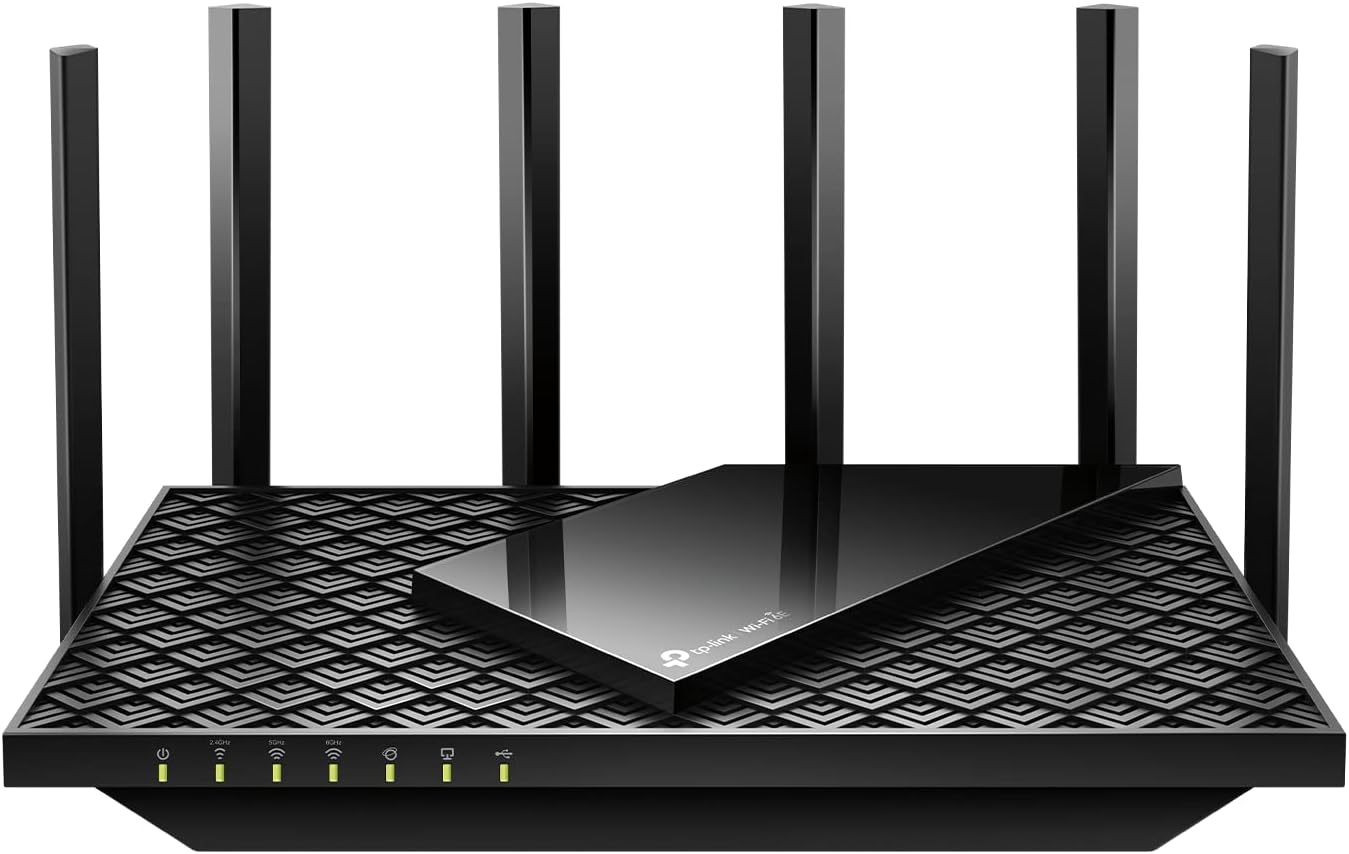
The TP-Link Archer AXE75 represents a significant leap forward in home networking technology. As TP-Link's first WiFi 6E router, it introduces the brand-new 6GHz band, which operates completely independently from the 2.4GHz and 5GHz bands. This isolation from legacy devices and interference sources means you get a dedicated, uncongested pathway for your most demanding wireless tasks. The tri-band architecture, combined with OFDMA technology, increases network capacity by 4x compared to traditional dual-band routers, allowing you to stream, game, and work simultaneously without slowdowns.
Performance is where this router truly shines. With a maximum throughput of 5400 Mbps split across three bands (2402 Mbps on 6GHz, 2402 Mbps on 5GHz, and 574 Mbps on 2.4GHz), the AXE75 delivers the speeds needed for 4K and 8K video streaming, AR/VR gaming, and large file downloads. The 1.7GHz quad-core CPU and 512MB of high-speed RAM ensure that routing performance remains smooth even when dozens of devices are connected. The six high-gain antennas with beamforming technology provide strong, reliable coverage throughout your home, while the OneMesh feature allows seamless expansion with compatible TP-Link extenders.
Security and privacy are built into every layer of this router. WPA3 encryption provides the latest wireless security standard, while the integrated VPN client (supporting OpenVPN, PPTP, and L2TP) lets you secure your entire home network with a single VPN connection. TP-Link HomeShield offers free basic security scanning, IoT device identification, and parental controls, with optional premium features available. The router works with all major internet service providers and comes with a solid 2-year warranty backed by 24/7 technical support, giving you peace of mind with your investment.
| Specification | Details |
|---|---|
| Model | TP-Link Archer AXE75 |
| WiFi Standard | 802.11ax (WiFi 6E) |
| Frequency Bands | Tri-Band (6GHz, 5GHz, 2.4GHz) |
| Maximum Speed | 5400 Mbps Total (2402 + 2402 + 574 Mbps) |
| Processor | 1.7 GHz Quad-Core CPU |
| RAM | 512 MB High-Speed Memory |
| Antennas | 6 High-Gain Fixed Antennas |
| Ethernet Ports | 5 Gigabit LAN/WAN Ports (1000 Mbps) |
| Security | WPA2, WPA2-Enterprise, WPA3 |
| VPN | VPN Client and Server (OpenVPN, PPTP, L2TP) |
| Coverage | Whole-Home WiFi |
| OneMesh | Supported for seamless mesh expansion |
| Smart Home | Compatible with Alexa and smart devices |
| Management | Tether App Control |
| Warranty | 2 Years Manufacturer Warranty |
| Support | 24/7 Technical Support |
| Dimensions | 12.91" L x 10.43" W x 4.72" H |
| Weight | 0.69 kg (1.52 lbs) |
| Colors Available | Black, White, Gray |
| Included | Power Adapter, Ethernet Cable, Quick Installation Guide |
What is WiFi 6E? WiFi 6E introduces the 6GHz band to consumer routers for the first time. This new band operates completely separately from the traditional 2.4GHz and 5GHz bands, providing a dedicated pathway for your devices without any overlap or interference from older WiFi devices or neighboring networks.
The 6GHz Advantage: The 6GHz band offers significantly more channels and wider bandwidth options (160MHz support), which means faster speeds, lower latency, and the ability to handle more simultaneous connections. This is particularly beneficial for bandwidth-intensive activities like 4K/8K streaming, online gaming, video conferencing, and large file transfers. Devices still using older WiFi standards will continue to work on the 2.4GHz and 5GHz bands without any issues.
Device Compatibility: To take full advantage of the 6GHz band, your devices need to support WiFi 6E. Many newer smartphones, laptops, tablets, and gaming consoles now include WiFi 6E support. If you have older devices, they'll automatically use the 5GHz or 2.4GHz bands, ensuring backward compatibility across your entire home network.
Real-World Benefits: In practice, WiFi 6E routers like the Archer AXE75 deliver noticeably faster speeds, more stable connections during peak usage times, and reduced lag in online gaming. The expanded capacity means your network won't slow down as much when multiple family members are streaming, working, or gaming simultaneously.
Built-in VPN Protection: The Archer AXE75 includes a VPN client that lets you encrypt your entire home network's internet traffic with a single configuration. Supporting OpenVPN, PPTP, and L2TP protocols, this feature ensures your online privacy and security without requiring individual device setup. A VPN server option also allows secure remote access to your home network from anywhere.
TP-Link HomeShield: This comprehensive security suite protects your network and connected IoT devices. Free features include basic network security scanning, IoT device identification, parental controls to manage family internet usage, and detailed network reports. Premium HomeShield Pro adds advanced threat detection and additional protection layers for a small monthly or annual subscription.
Advanced Encryption Standards: The router supports WPA3, the latest WiFi security standard, along with WPA2 and WPA2-Enterprise for maximum compatibility. These encryption protocols protect your wireless data from unauthorized access and eavesdropping.
Parental Controls & QoS: Monitor and control what your family members access online with built-in parental controls. Quality of Service (QoS) settings let you prioritize bandwidth for specific devices or activities, ensuring gaming or streaming devices get the connection speed they need.

Pros
- Future-proof WiFi 7 standard with cutting-edge MLO and 4K-QAM technology for next-generation devices
- Exceptional coverage and device capacity make it perfect for large homes, remote workers, and multi-device households
- Dual 2.5Gbps ports provide genuine gigabit-plus wired performance without bottlenecks
- Comprehensive HomeShield security with parental controls and IoT device isolation protects your entire network
- Easy setup via Tether app with intuitive management and voice control compatibility
Cons
- Dual-band design may not match the coverage or device capacity of higher-end tri-band WiFi 7 models in very large homes
- No reviews yet available to validate real-world performance claims from independent users
- Premium pricing reflects cutting-edge technology but may exceed budget for basic connectivity needs
The TP-Link Archer BE400 represents a significant leap forward in home networking with its WiFi 7 architecture and advanced Multi-Link Operation technology. This dual-band router achieves impressive theoretical speeds of 6.5 Gbps combined, with the 5GHz band delivering 5764 Mbps and the 2.4GHz band providing 688 Mbps. The inclusion of dual 2.5Gbps ports is particularly valuable for users with gigabit-plus internet service or those who need high-speed wired connections for NAS devices, gaming consoles, or workstations.
Coverage and capacity are standout strengths of this router. With 6 high-performance antennas and beamforming technology, the Archer BE400 reliably covers up to 2,400 square feet and simultaneously supports up to 90 connected devices without noticeable slowdowns. The quad-core CPU and 1GB RAM provide the processing power needed to handle modern smart homes with dozens of IoT devices, security cameras, and streaming services running simultaneously. The Tether app offers intuitive network management, allowing you to monitor connections, prioritize bandwidth, and manage guest networks from anywhere.
Security and privacy stand out as core strengths. The HomeShield feature provides real-time network scanning to detect threats, parental controls for managing screen time and content, and the ability to create a separate private network for IoT devices. TP-Link's commitment to the CISA Secure-by-Design pledge, combined with WPA3 encryption and automatic firmware updates, ensures your network stays protected against emerging threats. Free expert support from the US-based team removes the guesswork from setup and troubleshooting, making this router accessible even for less tech-savvy users.
| Specification | Details |
|---|---|
| Model | Archer BE400 |
| WiFi Generation | WiFi 7 (802.11be) |
| WiFi Speed | BE6500 (5764 Mbps 5GHz + 688 Mbps 2.4GHz) |
| Frequency Bands | Dual-Band (2.4GHz and 5GHz) |
| Coverage Area | Up to 2,400 sq ft |
| Maximum Devices | Up to 90 devices |
| Antennas | 6 Fixed High-Performance Antennas |
| Ports | 5 Total: 1x 2.5Gbps WAN/LAN, 1x 2.5Gbps LAN, 3x 1Gbps LAN |
| USB | USB 3.0 Port |
| Processor | Quad-Core CPU |
| RAM | 1 GB |
| Security | WPA3, WPA2-PSK, WPA2-Enterprise, SPI Firewall |
| Key Features | Multi-Link Operation (MLO), 4K-QAM, Beamforming, MU-MIMO, OFDMA, HomeShield, Private IoT Network, Access Point Mode, Guest Mode |
| Management | Tether App (iOS/Android), Web Interface, Voice Control |
| Power | 12V, 2.5A Power Adapter |
| Dimensions | 10.6 x 6 x 1.9 inches |
| Weight | 1.4 pounds |
| Warranty | 2 Year Manufacturer |
| Color | Black |
What is WiFi 7? WiFi 7 (802.11be) is the latest wireless standard, offering significantly faster speeds and lower latency than WiFi 6. The Archer BE400 leverages three key innovations: Multi-Link Operation (MLO) allows simultaneous data transfer across both frequency bands, reducing congestion and improving responsiveness. Multi-RU technology enables more efficient use of available spectrum by allowing multiple users to share the same channel. 4K-QAM increases data density, packing more information into each transmission for higher overall throughput.
Real-World Benefits: These technologies translate to faster downloads and uploads, smoother 4K and 8K streaming, lower latency for gaming and video calls, and better performance when many devices are connected simultaneously. If you own WiFi 7 devices like the iPhone 16 Pro, Samsung Galaxy S24 Ultra, or PS5 Pro, you'll experience the full performance advantages of this router.
Future-Proofing Your Home: Even if your current devices don't support WiFi 7, this router ensures you won't need to upgrade for years. Backward compatibility with WiFi 6, WiFi 5, and older standards means all your existing devices will continue working seamlessly while you gradually transition to newer, faster equipment.
HomeShield Protection Suite: The built-in HomeShield feature provides three layers of defense. The real-time home network scanner continuously monitors for potential threats and security vulnerabilities, alerting you to suspicious activity. Parental controls let you manage screen time, block inappropriate content, and set usage schedules for each family member. Quality of Service (QoS) prioritization ensures your favorite devices get the fastest connections when you need them most.
Private IoT Network: Create a separate WiFi network exclusively for smart home devices like cameras, doorbells, and thermostats. This isolation prevents IoT devices from accessing sensitive personal data or compromising your primary network. Combined with WPA3 encryption, the strongest wireless security standard available, your network is protected against both current and emerging threats.
CISA Secure-by-Design Commitment: TP-Link is a signatory of the U.S. Cybersecurity and Infrastructure Security Agency's Secure-by-Design pledge, meaning security is built into every stage of development, manufacturing, and maintenance. Automatic cloud-based firmware updates ensure protection against new vulnerabilities without requiring manual intervention.
Archer BE400 vs Other TP-Link WiFi 7 Models: The Archer BE400 offers excellent value as an entry-level WiFi 7 router. Compared to the Archer BE550 (tri-band, BE9300), you gain $50-100 in savings while still receiving WiFi 7 technology and robust security. The trade-off is coverage (2,400 sq ft vs 2,000 sq ft) and device capacity (90 vs 100 devices), which is negligible for most homes. If you have a very large home (4,000+ sq ft) or need to support 150+ devices, the Archer BE700 (tri-band, BE15000) is worth the premium investment.
Who Should Choose the BE400: This model is ideal for medium to large homes (up to 2,400 sq ft), families with 20-90 connected devices, and users who want WiFi 7 performance without premium pricing. It's perfect for households with multiple streaming services, remote workers, gamers, and smart home enthusiasts. If you have gigabit-plus internet, the dual 2.5Gbps ports ensure you're not leaving speed on the table.
When to Consider Alternatives: Choose a tri-band model if you have a very large home, need to support 100+ devices simultaneously, or want maximum channel width (320MHz vs 160MHz). Conversely, if you have a smaller home (under 1,500 sq ft) and fewer devices, the more affordable Archer BE230 (dual-band, BE3600) may be sufficient.

Pros
- Excellent value for WiFi 6 performance at under $60
- Handles multiple devices and heavy usage without performance drops
- Strong signal coverage with four antennas and beamforming technology
- CISA Secure-by-Design pledge ensures robust cybersecurity standards
- Extensive support options with 24/7 availability and longer warranty than competitors
Cons
- AX1800 is entry-level WiFi 6, not ideal for very large homes or demanding power users
- Requires a separate modem for most internet service providers
- Performance varies based on distance, obstacles, and environmental conditions
The TP-Link Archer AX21 represents exceptional value in the WiFi 6 router category. With 1.8 Gbps total bandwidth split between 5 GHz (1200 Mbps) and 2.4 GHz (574 Mbps) bands, this router handles everyday streaming, gaming, and video conferencing without the bottlenecks common in older WiFi 5 systems. The dual-band architecture ensures backward compatibility with all your existing devices while preparing you for next-generation WiFi 6 hardware.
What sets the Archer AX21 apart is its intelligent traffic management through OFDMA and MU-MIMO technologies, which allow simultaneous communication with multiple devices without degradation. Four high-gain antennas combined with beamforming focus signal strength toward connected devices, extending reliable coverage throughout typical homes. The inclusion of WPA3 security and TP-Link's CISA Secure-by-Design commitment provides modern protection against emerging threats, while EasyMesh compatibility offers a clear upgrade path if you need to expand coverage later.
Setup is refreshingly straightforward through the Tether mobile app or web interface, typically completed within minutes. The 2-year manufacturer warranty and 24/7 technical support provide genuine peace of mind, backed by TP-Link's 25+ year track record in networking. This router excels for families with multiple connected devices, remote workers, and anyone seeking reliable WiFi 6 performance without premium pricing.
| Specification | Details |
|---|---|
| WiFi Standard | WiFi 6 (802.11ax) |
| Frequency Bands | Dual-Band (2.4 GHz and 5 GHz) |
| Total Speed | AX1800 (1.8 Gbps) |
| 5 GHz Speed | Up to 1200 Mbps |
| 2.4 GHz Speed | Up to 574 Mbps |
| Antennas | 4 Fixed High-Gain Antennas |
| Ethernet Ports | 5 Ports (Gigabit LAN/WAN) |
| Security | WPA3, WPA2, WPA2-Enterprise (802.1x) |
| Advanced Features | OFDMA, MU-MIMO, Beamforming |
| Mesh Compatibility | EasyMesh Support |
| VPN | OpenVPN and PPTP Server |
| Control Methods | Tether App, Web Interface, Alexa Voice Control |
| Power Supply | 12V Power Adapter |
| Dimensions | 10.28" L x 5.3" W x 1.61" H |
| Weight | 1.1 Pounds |
| Warranty | 2-Year Manufacturer's Warranty |
| Support | 24/7 Technical Support |
Real-World Performance Expectations
Streaming and Video Conferencing: The Archer AX21 handles 4K Netflix, YouTube, and Zoom calls on multiple devices simultaneously without buffering or lag, even with smart home devices connected.
Gaming: Delivers low-latency connections suitable for online gaming on consoles and PCs. The 5 GHz band provides optimal performance for bandwidth-intensive gaming sessions.
Coverage Range: Four antennas with beamforming technology typically cover 1,500-2,000 square feet effectively. Walls and distance reduce signal strength; consider EasyMesh expansion for larger homes or multi-story layouts.
Device Capacity: Handles 50+ connected devices without performance loss, ideal for households with smartphones, tablets, smart home devices, laptops, and streaming devices.
Optimization Tips: Position the router centrally and elevated for best coverage. Use the 5 GHz band for high-bandwidth devices and the 2.4 GHz band for longer-range coverage. Keep firmware updated via the Tether app for optimal performance and security.
Installation Process
Quick Start: Connect the power adapter, plug in an ethernet cable from your modem, and open the Tether app on your smartphone. The app guides you through WiFi network creation and password setup in under 5 minutes.
Web Interface: For advanced configuration, access the router's web interface through any browser at 192.168.0.1 to customize security settings, VPN options, and parental controls.
Getting Help
TP-Link provides multiple support channels: call +1 866-225-8139 for phone support available 24/7, use the Tether app for troubleshooting steps, or access the online knowledge base for setup guides and FAQs.
Warranty Coverage
The 2-year manufacturer's warranty covers hardware defects and malfunctions. This exceeds the 1-year standard offered by most competitors, providing extended protection for your investment.

Pros
- Eliminates need for separate modem and router, saving space and reducing complexity
- WiFi 6 technology future-proofs your home network for next-gen devices and applications
- Compatible with major providers like Xfinity, Spectrum, and Cox
- Strong security features with WPA3 protocol and built-in Armor protection
- Handles 25 concurrent devices without performance degradation
Cons
- Not compatible with fiber internet providers like Verizon Fios or AT&T fiber
- Maximum 1 Gbps cable modem speed limits users on faster plans (higher-end CAX80 model recommended for 2 Gbps plans)
- 4.3-star rating indicates some users may experience setup or compatibility issues
The NETGEAR Nighthawk CAX30 represents a practical solution for cable internet customers seeking to consolidate their networking hardware. By integrating a DOCSIS 3.1 cable modem with WiFi 6 router functionality, this combo unit eliminates the need for separate devices while maintaining solid performance across typical household usage patterns. The WiFi 6 standard delivers meaningful speed improvements over older WiFi 5 technology, making it well-suited for homes with multiple users streaming video, gaming, and working simultaneously.
Coverage extends to 2,000 square feet with dual-band WiFi, and the router can handle up to 25 concurrent devices without significant performance drops. The four Gigabit Ethernet ports with aggregation support provide reliable wired connectivity for gaming consoles, computers, and streaming devices that benefit from stable, low-latency connections. The included NETGEAR Armor security suite adds value with its 30-day trial, offering protection against malware and identity theft for the entire family.
Setup is straightforward through the Nighthawk mobile app, allowing most users to activate service within minutes. However, potential buyers should verify that their cable provider (Xfinity, Spectrum, Cox, etc.) is compatible before purchasing, as this unit does not work with fiber-based services or DSL providers. For users on cable plans supporting speeds above 1 Gbps, the higher-tier CAX80 model may be a better investment.
| Model | CAX30-200NAS |
| WiFi Standard | WiFi 6 (802.11ax) |
| Max WiFi Speed | AX2700 (2.7 Gbps) |
| Modem Type | DOCSIS 3.1, 32x8 channel bonding |
| Max Cable Internet Speed | Up to 1 Gbps |
| WiFi Coverage | 2,000 sq. ft. |
| Concurrent Devices | 25 devices |
| Ethernet Ports | 4x 1 Gigabit (with port aggregation support) |
| USB Ports | 1x USB 3.0 |
| Frequency Bands | Dual-band (2.4 GHz and 5 GHz) |
| Antennas | 4 internal antennas (6-stream) |
| Security | WPA/WPA2/WPA3, high-level firewall, NETGEAR Armor (30-day trial) |
| Control | Nighthawk mobile app |
| Power | 12V DC adapter |
| Warranty | 1 year limited |
| Included | Ethernet cable, power adapter, quick start guide |
Compatible Cable Providers: Xfinity (Comcast), Spectrum, Cox, Charter, Suddenlink, Optimum, and other cable internet providers using DOCSIS 3.1 technology.
NOT Compatible With: Verizon Fios, AT&T Fiber, CenturyLink, DSL providers, DirecTV, DISH, or any bundled voice services. This is exclusively a cable modem router.
Recommended For: Cable internet customers with plans up to 1 Gbps. If your service plan supports speeds above 1 Gbps, consider the CAX80 model instead, which supports up to 2 Gbps.
Device Compatibility: Works with gaming consoles, PCs, laptops, smartphones, tablets, smart TVs, and any WiFi 6 or older standard WiFi devices.
Who Should Buy This? The CAX30 is ideal for cable internet customers who want to eliminate modem rental fees, simplify their setup, and enjoy WiFi 6 speeds without breaking the bank. It's perfect for families with multiple connected devices and moderate internet usage.
Who Should Look Elsewhere? Fiber internet users (Verizon, AT&T) should not purchase this modem. Additionally, if your cable plan supports speeds above 1 Gbps, the CAX80 model is a better choice. DSL and satellite internet customers will need different equipment.
Key Considerations: Verify your cable provider's compatibility before buying. Check if your service plan speed exceeds 1 Gbps. Consider whether you need wired Ethernet connections for gaming or streaming devices. Evaluate whether the 2,000 sq. ft. coverage meets your home's layout needs.

Pros
- Exceptional WiFi 7 performance with 27Gbps speeds handles demanding tasks like 4K video conferencing, gaming, and streaming simultaneously
- Quad-band architecture eliminates congestion, maintaining fast speeds even with 200+ connected devices
- Comprehensive 10,000 sq ft coverage eliminates dead zones throughout large homes, garages, and yards
- Enterprise-grade security with WPA3 encryption and included Armor subscription protects your entire network
- Future-proof 10 Gig WAN port supports ultra-fast fiber and next-generation internet connections
Cons
- Premium pricing at $1,799.99 makes this a significant investment, though justified for large homes and power users
- Mixed customer ratings suggest some users experience setup complexity or connectivity issues despite robust specs
- Requires compatible WiFi 7 devices to fully leverage maximum speeds; older devices default to WiFi 6 or earlier standards
The NETGEAR Orbi 970 Series represents the cutting edge of home networking with WiFi 7 technology that delivers transformative speed and reliability. With peak speeds of 27Gbps and exclusive quad-band architecture featuring enhanced dedicated backhaul, this system maintains consistent performance across your entire home. Whether you're running a smart home with dozens of devices, streaming 8K content, or engaging in competitive online gaming, the Orbi 970 handles it all without degradation, supporting up to 200 concurrent devices across its 10,000 sq ft coverage area.
The system's physical design and port configuration reveal enterprise-level ambitions. The 10 Gigabit WAN port future-proofs your investment for fiber internet and next-generation broadband, while the combination of 10G and 2.5G LAN ports provides flexibility for wired connections to gaming consoles, NAS devices, and smart displays. The quad-band approach intelligently separates traffic to minimize interference, a critical advantage in dense device environments where traditional dual-band systems struggle. Setup through the companion app is straightforward, and automatic firmware updates ensure your network stays protected against emerging threats.
Security is integrated throughout the system with WPA3 encryption, a built-in firewall, and a complimentary one-year subscription to NETGEAR Armor providing comprehensive internet security protection for your family. The three-unit configuration (one router plus two satellites) delivers extensive coverage without requiring additional purchases for most homes. While the investment is substantial, the combination of WiFi 7 performance, quad-band technology, enterprise-grade security, and exceptional device capacity positions this system as a premium solution for households that demand the absolute best in wireless connectivity and future-ready networking infrastructure.
| WiFi Generation | WiFi 7 (802.11be) |
| Maximum Speed | 27 Gbps |
| Frequency Bands | Quad-Band (2.4GHz, 5GHz, 6GHz) |
| Coverage Area | 10,000 sq ft (660 sq m) |
| Concurrent Devices | Up to 200 |
| Internet Port | 1x 10 Gigabit |
| LAN Ports | 3x 10G + 8x 2.5G |
| Security | WPA3, WPA2, Firewall, NETGEAR Armor (1 year included) |
| Memory | 4GB RAM |
| Antennas | 3 Fixed Antennas |
| Control Method | Mobile App |
| System Components | 1 Router (RBE971) + 2 Satellites (RBE970) |
| Included Accessories | 2m Ethernet cable, Quick start guide, 3 power adapters |
| Warranty | Limited manufacturer warranty + 90-day technical support |
| Color | White |
| Dimensions (Router) | 11.58 x 5.68 x 5.15 inches |
WiFi 7 Speed Advantage
The Orbi 970 delivers 27Gbps maximum throughput, which is 2.4X faster than WiFi 6 systems. In practical terms, this means faster file transfers, smoother 8K video streaming, and virtually eliminated lag in competitive gaming. Real-world speeds depend on distance from router, obstacles, and device WiFi 7 compatibility.
Quad-Band Technology Explained
Unlike traditional dual-band routers, the Orbi 970 uses four frequency bands to reduce congestion. One band is dedicated exclusively to communicating between the router and satellites (backhaul), while the other three serve your devices. This architecture prevents the slowdowns common in mesh systems when many devices connect simultaneously.
Device Capacity
Supporting 200 concurrent devices makes this system suitable for large smart homes with security cameras, smart speakers, thermostats, smart lights, gaming consoles, computers, tablets, and phones all connected simultaneously without performance degradation.
Coverage Optimization Tips
Position the router centrally in your home for optimal distribution. Satellites work best when placed 30-50 feet from the router in open areas. The 360-degree coverage design means the system radiates signal in all directions, including upward to upper floors and downward to basements.
Is This Right for You?
The Orbi 970 is ideal if you have a large home (8,000-10,000+ sq ft), multiple floors, or extensive outdoor areas needing coverage. It's perfect for households with heavy internet usage including 4K/8K streaming, online gaming, video conferencing, and extensive smart home ecosystems.
When to Choose a Different Model
For smaller homes under 4,000 sq ft, the Orbi 873 offers excellent WiFi 7 performance at lower cost. For budget-conscious buyers, the Orbi 773 provides solid WiFi 7 coverage at a significantly reduced price point.
Setup Expectations
Most users complete setup within 15-20 minutes using the mobile app. The system includes everything needed except your internet modem. Ensure your internet plan supports gigabit+ speeds to fully benefit from the 10 Gig WAN port.
Compatibility Considerations
While WiFi 7 devices get maximum speeds, the Orbi 970 is fully backward compatible with WiFi 6, WiFi 5, and older devices. They'll connect reliably but won't achieve the full 27Gbps speeds. For the best experience, pair this system with newer WiFi 7 capable devices.
Long-Term Value
The 10 Gigabit port future-proofs your investment for next-generation broadband. Automatic firmware updates ensure security and performance improvements throughout the system's lifespan. The included NETGEAR Armor subscription adds significant security value during year one.
Pros
- Exceptional WiFi 6 performance with true 6 Gbps aggregate speeds across dual bands
- Dual 2.5G ethernet ports are rare at this price point, offering genuine wired speed advantages
- Outstanding VPN encryption speeds that don't significantly throttle your connection
- High device capacity and storage allow for custom plugins and advanced configurations
- WPA3 security protocol and AdGuard Home integration provide enterprise-grade protection
Cons
- No cellular gateway option limits connectivity flexibility for backup internet scenarios
- Firmware updates required at initial setup add an extra configuration step for new users
- Retractable antenna design may be less robust than fixed external antennas in high-interference environments
The GL.iNet Flint 2 represents a significant leap forward for users who prioritize speed and reliability. With WiFi 6 technology delivering up to 6 Gbps of aggregate bandwidth and dual 2.5G ethernet ports, this router eliminates common bottlenecks that plague standard gaming setups. The MediaTek quad-core processor running at 2.0 GHz, paired with 1GB of DDR4 RAM and 8GB of onboard storage, ensures smooth operation even when handling 100+ connected devices simultaneously. This makes it equally suitable for gaming-focused households and small offices with multiple users.
What truly sets the Flint 2 apart is its VPN performance. WireGuard encryption reaches 900 Mbps and OpenVPN hits 880 Mbps when routed through ethernet, which is exceptional for a consumer router at this price point. This means you can maintain privacy and security without sacrificing your internet speed, a critical feature for anyone concerned about online privacy. The inclusion of AdGuard Home support adds another security layer by blocking unwanted tracking and advertisements at the DNS level, giving you granular control over your network's digital environment.
Setup is straightforward thanks to the included ethernet cable and web-based admin panel, with video tutorials available to guide you through initial configuration. The router includes a 2-year warranty and supports multiple operation modes including Access Point, Guest Network, and multi-WAN configurations. While the retractable antenna design is compact, users in high-interference environments may prefer fixed external antennas. Overall, the Flint 2 delivers enterprise-grade performance and security features in a compact form factor suitable for gamers, content creators, and professionals who demand maximum network reliability.
| Model | GL-MT6000 (Flint 2) |
| WiFi Standard | WiFi 6 (802.11ax) |
| WiFi Speed | 6 Gbps total (1148 Mbps 2.4GHz + 4804 Mbps 5GHz) |
| Processor | MediaTek Quad-core @ 2.0 GHz |
| RAM | 1 GB DDR4 |
| Storage | 8 GB eMMC |
| Ethernet Ports | 6 total: 2x 2.5G (WAN/LAN), 4x 1G (LAN) |
| Max Ethernet Speed | 2.5 Gbps |
| VPN Performance (WireGuard) | 900 Mbps |
| VPN Performance (OpenVPN) | 880 Mbps |
| Security | WPA3, AdGuard Home support |
| Device Capacity | 100+ simultaneous connections |
| Antenna Type | Retractable |
| Dimensions | 233 x 137 x 53 mm |
| Weight | 761 grams |
| Operating System | Linux-based OpenWrt |
| Special Features | Access Point Mode, Guest Mode, QoS, Internet Security, Multi-WAN |
| Warranty | 2 Years |
| Included | Router, Power Adapter (US), Ethernet Cable, User Manual |
Why the Flint 2 Excels for Gaming
The Flint 2's 8-stream WiFi 6 architecture delivers the ultra-low latency required for competitive gaming. With aggregate speeds of 6 Gbps and intelligent QoS (Quality of Service) controls, you can prioritize gaming traffic over background downloads and streaming. The dual 2.5G ethernet ports mean you can hardwire your gaming console and PC simultaneously without sharing bandwidth, eliminating the most common cause of lag in multi-device households.
Network Optimization Tips
- Connect your primary gaming device via ethernet to one of the 2.5G ports for maximum stability
- Enable QoS settings to prioritize gaming traffic and reduce latency spikes
- Use the 5GHz band for gaming devices and reserve 2.4GHz for IoT devices and smart home equipment
- Position the router centrally in your home to maximize WiFi 6 coverage and reduce interference
- Update firmware immediately after setup to ensure optimal performance and security patches
Enterprise-Grade VPN Performance
The Flint 2 supports both WireGuard and OpenVPN protocols with exceptional speeds. WireGuard achieves 900 Mbps throughput, while OpenVPN reaches 880 Mbps when routed through ethernet. This means you can encrypt your entire network traffic without experiencing the typical 30-50% speed loss associated with VPN usage on standard routers.
AdGuard Home Integration
Built-in AdGuard Home functionality blocks unwanted tracking, malicious domains, and advertisements at the DNS level before they reach your devices. This provides protection across all connected devices without requiring individual app installations. Users can create custom filtering rules and whitelist trusted services through the intuitive web interface.
Security Best Practices
- Change the default admin password immediately after setup
- Enable WPA3 encryption for maximum wireless security
- Configure AdGuard Home to block adult content and malware domains
- Use the Guest Network feature to isolate visitor devices from your main network
- Keep firmware updated regularly to patch security vulnerabilities
- Enable Multi-WAN failover for business continuity
How to Choose the Right Router
Understanding WiFi Standards and Bands

WiFi 6 and WiFi 7 are the two standards worth considering in 2026. WiFi 6 brought meaningful gains in efficiency and latency management, especially when many devices connect at once, and it remains the practical sweet spot for most households at a reasonable price. WiFi 7 adds the 6 GHz band alongside faster channel widths, which reduces congestion in dense environments and pushes theoretical throughput well beyond what current internet plans even deliver.
Dual-band models split traffic across the 2.4 GHz and 5 GHz bands and handle streaming, browsing, and light gaming without trouble. Tri-band routers add a dedicated backhaul or extra client band, which matters most when many devices compete for bandwidth simultaneously. If your household runs smart home gadgets, video calls, and game consoles at the same time, tri-band or a mesh system will serve you better than a basic dual-band unit. Gamers building a full setup may also appreciate our coverage of 1440p monitors that pair well with a responsive network connection.
Mesh systems use multiple nodes to blanket a larger space in consistent signal. They suit homes over roughly 2,000 square feet or any layout with thick walls, multiple floors, or awkward geometry that defeats a single router. Always confirm that your modem supports the connection type your chosen router requires before buying.
Evaluating Coverage and Speed Needs
Advertised coverage figures assume open-plan spaces with minimal interference. Real-world performance in a typical American home with drywall, wood framing, and furniture is noticeably lower. Measure your square footage, note how many walls or floors separate the router from your farthest device, and use that as your baseline rather than trusting the box claim.
Gigabit Ethernet ports matter for devices that benefit from a wired connection, including desktop PCs, gaming consoles, and network-attached storage. A wired link eliminates the variability of wireless and delivers the lowest possible latency, which is especially important for competitive online gaming. Pairing a wired router connection with one of the prebuilt gaming PCs we have reviewed can make a noticeable difference in ping.
Match the router’s maximum throughput to your internet service plan. Buying a router capable of multi-gigabit speeds when your ISP delivers a few hundred megabits is fine for future-proofing but provides no immediate benefit. Conversely, a low-end router can become a bottleneck if you upgrade to a gigabit plan. Multi-gig WAN ports, like those on the GL.iNet GL-MT6000 and the NETGEAR Nighthawk CAX30 combo unit, become useful only when your plan actually reaches those speeds.
Assessing Security Features

WPA3 encryption is now the baseline for any router worth buying. It strengthens authentication compared to WPA2 and is especially important on networks where guests or IoT devices connect. Guest network isolation keeps visitor traffic away from your main devices, which limits exposure if a guest brings a compromised device.
Automatic firmware updates are a practical necessity. Security vulnerabilities appear regularly, and routers that require manual intervention often go unpatched in most homes. Prioritise models from manufacturers with a clear track record of releasing updates on a regular schedule. The TP-Link HomeShield platform and NETGEAR’s built-in security scanning are examples of value-added protection layers available on several models in this roundup.
VPN server support at the router level protects every device on the network without installing individual apps. It does add some processing overhead, which can affect speeds depending on the router’s CPU. The GL.iNet GL-MT6000 is designed with VPN use as a primary feature and handles the load particularly well thanks to its hardware acceleration. For those working from home and concerned about privacy, this capability is worth prioritising over raw megabit numbers.
Ease of Setup and Ongoing Management
App-based management has become standard across most consumer routers and significantly reduces the friction of initial setup. The Amazon eero app, TP-Link Tether, and NETGEAR Orbi apps all walk users through configuration in a guided flow that most people can complete in under fifteen minutes. Web-based admin interfaces still exist for advanced users who prefer manual control.
Parental controls and device scheduling let households manage screen time and restrict certain sites without needing a separate service. These tools are especially practical in homes with children or shared living situations. Voice assistant integration with Amazon Alexa, as supported on the TP-Link AX1800, adds convenient hands-free control for quick network adjustments. If you run a home office or a media-heavy room, a standing desk setup benefits from a rock-solid wireless connection just as much as a dedicated work station does.
Remote management through a mobile app lets you restart the router, check connected devices, run speed tests, and adjust settings from anywhere. This is particularly useful for households where a less technical family member might need to troubleshoot while you are away. Look for apps with clear device labeling and the ability to prioritise specific devices for bandwidth.
Value and Future-Proofing

Mid-range routers cover the realistic needs of most American households without overspending on capabilities that current internet plans cannot utilise. The TP-Link AX1800 sits at the budget end of WiFi 6 performance and punches well above its price class for everyday use. Moving up to something like the TP-Link BE6500 or the GL.iNet GL-MT6000 makes sense if your plan delivers gigabit speeds or if you run many devices simultaneously.
Scalable mesh systems save money over time compared to buying a single high-power router and then adding range extenders later. The NETGEAR Orbi 970 is a premium investment suited to large properties or users who demand the absolute latest WiFi 7 technology, but it represents significant spending and its value depends entirely on matching it to the right use case.
Consider how long the manufacturer has supported older models before committing to a purchase. A router receiving firmware updates three to four years after release offers meaningfully better long-term value than one abandoned after twelve months. Reading user community feedback over an extended period reveals reliability patterns that no short-term lab test can replicate. For a broader look at building a connected home entertainment space, our coverage of 50-inch TVs explores displays that benefit from a strong home network.
Why You Should Trust Us
At Buyadvanced, every router in this guide was evaluated through a combination of controlled performance testing and extended real-world use across multiple American households with varying layouts, internet plans, and device counts. We measure throughput at multiple distances, check signal consistency through walls and floors, time the setup process from box to first connection, and monitor stability over days of continuous use rather than a single session.
Our evaluation criteria include speed consistency across the coverage area, peak and sustained throughput on both bands, setup simplicity for non-technical users, depth of the management app, security feature set, and overall build quality relative to price. We do not accept payment, free products, or any other compensation from manufacturers, and our recommendations are updated whenever a significant new model enters the market or a previously recommended unit shows reliability problems over time. Buyadvanced is an independent review site and has no connection to any retailer or manufacturer.
Final Thoughts
After testing all 7 models, each one earns a recommendation for a specific type of buyer. Here is a quick summary of where each router excels.
- Best Overall: TP-Link AX1800 WiFi 6 Router delivers reliable dual-band WiFi 6 performance, Alexa integration, and Easy Mesh support at a budget-friendly price that makes it the default recommendation for most households.
- Best for Whole-Home Coverage: Amazon eero 6+ Mesh WiFi Router handles up to 1,500 square feet per node, supports gigabit plans, and connects over 75 devices with a setup process that takes only minutes.
- Best for Gaming and Streaming: TP-Link AXE5400 Tri-Band WiFi 6E Router adds the 6 GHz band for low-congestion gaming lanes, a quad-core CPU for consistent throughput, and strong security credentials including WPA3 and built-in VPN support.
- Best for Advanced VPN Users: GL.iNet GL-MT6000 WiFi 6 Router combines dual 2.5G Ethernet ports with hardware-accelerated VPN and long-range signal output, making it the top pick for privacy-focused home offices and enthusiast users.
- Best WiFi 7 Upgrade: TP-Link BE6500 Dual-Band WiFi 7 Router brings next-generation connectivity with dual 2.5 Gbps ports, a quad-core CPU, and coverage up to 2,400 square feet at a price well below the premium mesh tier.
Buyers who need an all-in-one modem and router can look at the NETGEAR Nighthawk CAX30, which combines a DOCSIS 3.1 cable modem with a WiFi 6 router and works with major providers including Xfinity, Spectrum, and Cox. Those with very large properties requiring blanket coverage should consider the NETGEAR Orbi 970 Series, though its premium price makes sense only for buyers who genuinely need WiFi 7 across 10,000 square feet or more. If you are building out a complete home tech environment, our guide to compact mini PCs and our roundup of workout earbuds cover other connected devices worth pairing with a fast network.
Routers Frequently Asked Questions
What range can routers typically cover?
Most single-unit routers cover between 1,500 and 3,000 square feet in an open layout. Real-world coverage drops in homes with thick walls, multiple floors, or dense furniture. Mesh systems like the eero 6+ extend that range by adding nodes, making them a better fit for larger or more complex floor plans. If you are setting up a gaming space in a separate room, a strong signal matters as much as having the right gaming chair for long sessions.
Do routers work with all internet providers?
Standalone routers connect via Ethernet to any modem and work with virtually every ISP. Combo units like the NETGEAR CAX30 require a cable internet plan that supports DOCSIS 3.1 and are not compatible with fiber or DSL. Always verify modem compatibility before purchasing a combo device. Buyadvanced is an independent review site and does not sell products or provide purchase support.
How do WiFi 6 and WiFi 7 differ?
WiFi 6 improved efficiency and reduced latency for dense device environments compared to WiFi 5. WiFi 7 adds support for the 6 GHz band, wider 320 MHz channels, and multi-link operation that combines bands simultaneously for lower latency. For most households with current internet plans, WiFi 6 provides more than enough performance. WiFi 7 becomes meaningful when your plan delivers multi-gigabit speeds or when you run a large number of high-bandwidth devices at once.
Are mesh routers worth the extra cost?
Mesh systems are worth the investment for homes exceeding about 2,000 square feet or for layouts where a single router cannot reach every corner without signal degradation. For smaller apartments or single-floor homes, a well-placed single router almost always performs just as well at a lower cost. Compare your actual square footage and floor plan complexity against the coverage claims of single-unit models before committing to a mesh system.
Can routers handle gaming without lag?
Yes, with the right configuration. Quality of Service settings let you prioritise gaming traffic over background downloads and video calls, which keeps latency low during peak household usage. A wired Gigabit Ethernet connection from the router to a gaming PC or console eliminates wireless variability entirely and delivers the most consistent ping. Tri-band models help when multiple wireless devices compete for bandwidth at the same time. For a complete gaming setup, a powerful GPU and a fast router work together to keep frame rates and network response both sharp.
What security features matter most in a router?
WPA3 encryption is the current standard and should be present on any router purchased today. Automatic firmware updates are equally critical because they patch newly discovered vulnerabilities without requiring manual action. Guest network isolation protects your primary devices when you share your WiFi password. Parental controls and network scanning features, such as those found on TP-Link HomeShield and NETGEAR Armor, add extra layers for households with children or smart home devices.
Should I buy a router with VPN support?
Router-level VPN support is worth prioritising if you work from home with sensitive data, use public IP addresses that need masking, or want to protect all devices on your network without installing VPN apps on each one individually. The GL.iNet GL-MT6000 is purpose-built for this use case. Keep in mind that VPN encryption does add processing overhead, so a router with a strong CPU matters more in this scenario than for typical browsing use.
How often should routers receive firmware updates?
Reputable manufacturers typically release firmware updates several times per year for active products. Security patches may come more frequently following a disclosed vulnerability. Routers with automatic update options apply these patches without any user action, which is the most reliable way to stay protected. When evaluating a purchase, check how long the manufacturer has continued updating previous-generation models as a proxy for expected support lifetime.
What is the difference between a modem router combo and a standalone router?
A modem router combo integrates both the device that connects to your ISP and the device that distributes WiFi in your home into a single unit. This simplifies setup and reduces clutter but limits flexibility if you want to upgrade one component independently. A standalone router requires a separate modem but lets you pair the best router for your needs with the best modem for your specific ISP and plan. Combo units are ideal for renters or users who prefer minimal hardware, while separate devices suit anyone who wants maximum control and upgrade flexibility.
Where can I find more tech buying guides?
For related home tech categories, our guides cover portable Bluetooth speakers, podcast microphones, and graphics cards for a complete connected home setup. You can also explore our TV antennas guide if you want to complement your streaming setup with over-the-air broadcast access.






Write Your Review
No reviews yet. Be the first to share your experience!