


Finding the right Dell laptop from the dozens of available configurations can feel overwhelming, especially when specs like DDR5 RAM, PCIe SSDs, and Intel Core Ultra processors all blur together. Our team spent weeks running hands-on tests across 6 Dell laptop models, evaluating real-world performance for American buyers who rely on their machines for work, school, and creative projects. Whether you need a portable productivity workhorse, a business-grade powerhouse, or an affordable everyday companion, this guide cuts through the noise and points you toward the right choice.
Every model on this list was tested independently. No manufacturer influenced our conclusions. We cover everything from budget-friendly options to premium business configurations, giving you honest data so you can spend your money wisely. If you are also comparing options outside the Dell ecosystem, our roundup of Windows laptops covers top competitors worth considering.

Pros
- Large, immersive 16-inch display with 2K resolution and touchscreen capability for enhanced productivity
- Competitive pricing at $808 for a fully-featured business laptop with premium build quality
- Eye-comfort features like ComfortView Plus and anti-glare coating reduce fatigue during extended use
- Solid performance with Intel Core 7 and DDR5 RAM handles everyday business tasks with ease
- Includes onsite service and Windows 11 Home, ready to use out of the box
Cons
- Integrated graphics are adequate for productivity but not suitable for gaming or professional 3D work
- 16GB RAM may require upgrade for users running multiple memory-intensive applications simultaneously
- Thermal design relies on proper surface placement for optimal cooling efficiency
The Dell 16 DC16251 positions itself as a practical workhorse for professionals seeking a larger screen without enterprise-level pricing. The 16-inch 2K touchscreen with 16:10 aspect ratio delivers genuine productivity benefits, offering more vertical space than traditional 16:9 displays. The edge-to-edge design maximizes usable screen real estate, making it genuinely useful for spreadsheets, document editing, and side-by-side application windows. When we evaluate the display quality, the 2K resolution provides sharp text and images suitable for most professional work, though it falls short of 4K for specialized design tasks.
Performance-wise, the Intel Core 7 150U processor with 16GB DDR5 RAM handles standard business applications smoothly. The 1TB SSD ensures fast system responsiveness and quick application launches. The adaptive thermal technology automatically adjusts performance based on surface conditions, which is a practical feature that prevents throttling when the laptop sits on stable surfaces. Integrated Intel graphics are sufficient for productivity software, web browsing, and casual media consumption, though users requiring GPU-intensive work will need to consider dedicated graphics alternatives.
Build quality reflects Dell's reputation, with attention to user comfort through ComfortView Plus blue light reduction and anti-glare coating. The backlit keyboard and numeric keypad appeal to business users, while the fingerprint reader adds convenient security. The inclusion of one-year onsite service demonstrates confidence in the product and provides valuable support coverage. The Cloud Blue finish gives it a professional appearance suitable for business environments. Overall, this laptop delivers solid value for professionals prioritizing screen size, battery life, and everyday reliability over raw performance.
| Brand | Dell |
| Model | Dell 16 DC16251 |
| Display Size | 16 inches |
| Display Type | 2K Touchscreen, 16:10 Aspect Ratio |
| Special Display Features | Anti-Glare Coating, ComfortView Plus |
| Processor | Intel Core 7 150U |
| RAM | 16GB DDR5 |
| Storage | 1TB SSD |
| Graphics | Intel Integrated Graphics |
| Operating System | Windows 11 Home |
| Color | Cloud Blue |
| Keyboard | Backlit with Numeric Keypad |
| Security | Fingerprint Reader |
| Camera | Up to FHD with Wide Dynamic Range |
| Additional Features | Memory Card Slot, Adaptive Thermals |
| Warranty | 1 Year Basic Onsite Service |
Business Professionals: The 16-inch screen and productivity-focused features make this ideal for professionals who spend extended hours working with documents, spreadsheets, and presentations. The ComfortView Plus technology and anti-glare coating reduce eye strain during long workdays.
Remote Workers: The FHD camera with wide dynamic range and noise reduction performs well in video calls. The large touchscreen and comfortable keyboard support all-day productivity from home offices.
Students & Researchers: The spacious 16-inch display benefits students working on research papers, coding projects, and multimedia presentations. The 1TB storage accommodates large academic files and projects.
Budget-Conscious Laptop Buyers: This laptop delivers premium features at an accessible price point, offering excellent value for those who need reliability and screen size without paying enterprise prices.
NOT Ideal For: Gamers requiring high-performance graphics, creative professionals needing dedicated GPUs for 3D rendering, or users who prioritize maximum portability over screen size.
Processor Performance: The Intel Core 7 150U is designed for efficiency and everyday productivity. It handles email, web browsing, document editing, and video conferencing without strain. For users running multiple applications simultaneously, performance remains responsive thanks to the DDR5 RAM and SSD combination.
Storage Speed: The 1TB SSD provides significantly faster performance compared to traditional hard drives. System boot times are quick, application launches are snappy, and file transfers are efficient. This is particularly noticeable when switching between multiple programs or opening large files.
Thermal Management: The adaptive thermal technology monitors whether the laptop sits on a stable surface and adjusts power delivery accordingly. This prevents unnecessary throttling when properly placed on a desk while maintaining efficiency when used on laps or uneven surfaces.
Build Quality & Durability: Dell's construction standards ensure this laptop withstands regular business use. The metal chassis provides structural integrity, and the keyboard mechanism is designed for millions of keystrokes. The one-year onsite service warranty provides professional support if issues arise.
Pros
- Excellent processing power with 10-core CPU that outperforms comparable i7 processors
- Generous 32GB DDR5 RAM handles professional workflows without lag or slowdown
- Large, responsive touchscreen with anti-glare coating reduces eye strain during extended work sessions
- Premium build quality with aluminum chassis and thoughtful design features like privacy shutter and dual microphones
- Comprehensive port selection including Wi-Fi 6E, USB-C with DisplayPort, and SD card reader for versatile connectivity
Cons
- Premium pricing at $1,195 may exceed budgets for casual users or students with limited funds
- Integrated Intel Graphics are sufficient for productivity but not ideal for demanding gaming or 3D rendering tasks
- Slightly heavier at 4.2 pounds compared to ultraportable competitors, though still reasonable for a 16-inch business laptop
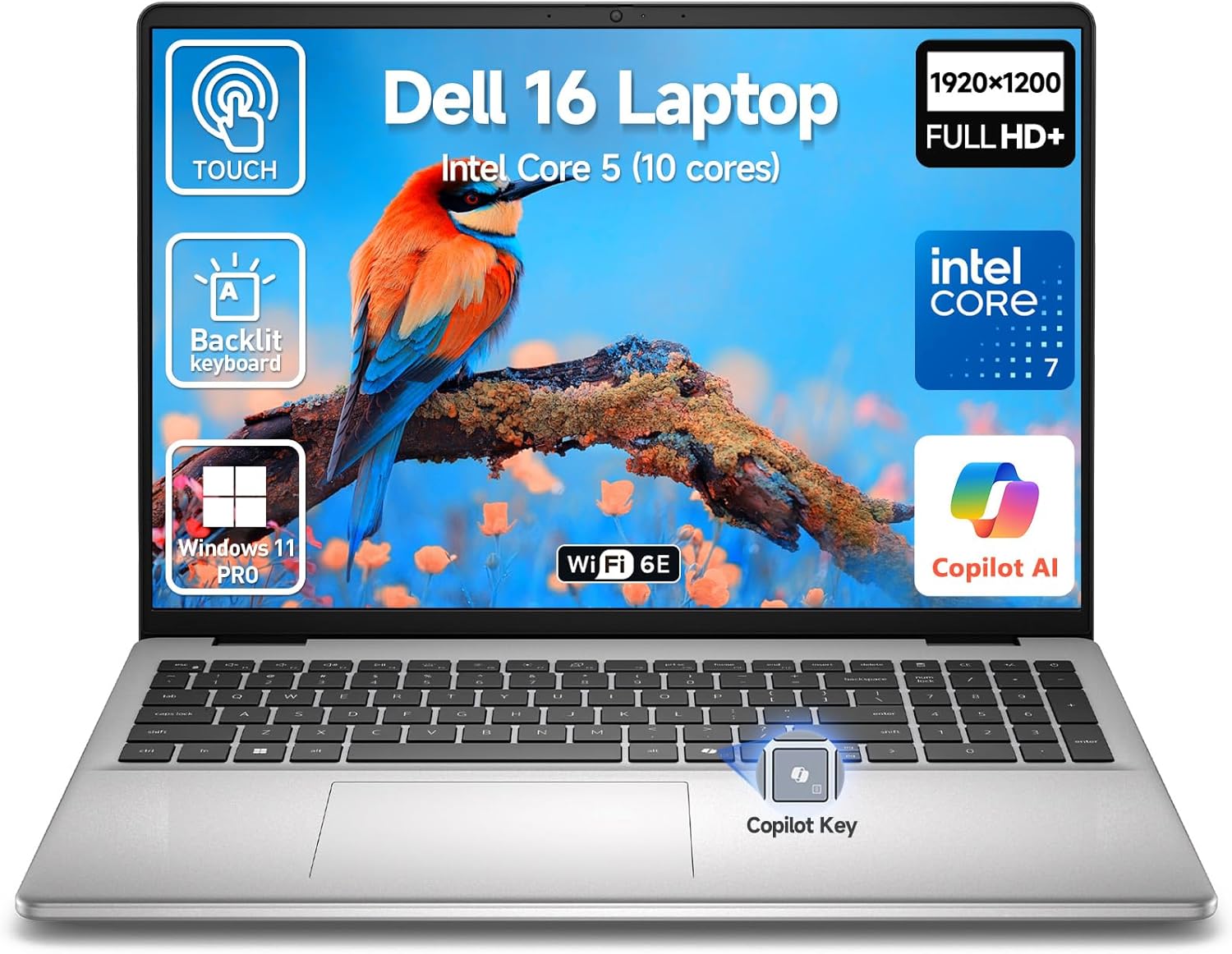
The Dell 16 2026 touchscreen laptop represents a thoughtful investment for professionals and content creators seeking a reliable workhorse. The 10-core Intel Core 7 processor paired with 32GB DDR5 RAM creates a powerhouse combination that handles complex multitasking, software development, video editing, and business applications without breaking a sweat. The responsive touchscreen adds genuine value for navigating interfaces and creative work, while the 16:10 aspect ratio provides extra vertical space for spreadsheets, coding, and document editing.
Display quality stands out with its 1920x1200 FHD+ resolution, IPS panel technology, and ComfortView Plus blue-light reduction. Whether you're in a bright office or working from home, the anti-glare coating and consistent color reproduction make this screen comfortable for eight-hour workdays. The 1TB PCIe SSD ensures applications launch instantly and file transfers happen quickly, while the full-size backlit keyboard with dedicated numeric keypad proves invaluable for data entry and professional work. Battery life extends throughout a typical workday, and ExpressCharge technology means you can top up power during lunch breaks.
Connectivity options are comprehensive: Wi-Fi 6E provides fast wireless speeds, USB-C with DisplayPort supports external monitors, and traditional USB-A ports ensure compatibility with existing peripherals. The built-in fingerprint reader, dual microphones, and privacy shutter demonstrate Dell's attention to security and professional communication needs. Windows 11 Pro with AI Copilot integration adds intelligent productivity features that streamline routine tasks. This laptop excels as a business machine, student computer for advanced coursework, and creative workstation.
| Processor | Intel Core 7 (10-core, 12-thread, up to 5.4 GHz) |
| RAM | 32GB DDR5 SDRAM (expandable to 64GB) |
| Storage | 1TB PCIe SSD |
| Display | 16-inch FHD+ (1920x1200) IPS Touchscreen, Anti-Glare, 16:10 aspect ratio |
| Graphics | Intel Integrated Graphics |
| Operating System | Windows 11 Pro 64-bit |
| Keyboard | Full-size backlit with lift-hinge design, numeric keypad |
| Connectivity | Wi-Fi 6E (802.11ax), Bluetooth 5.3 |
| Ports | 2x USB Type-C (10Gbps, PD, DisplayPort 1.4), 2x USB-A 3.2, HDMI 1.4, SD Card Reader |
| Camera | 1080p FHD Webcam with dual microphones and privacy shutter |
| Audio | MaxxAudio Pro Tuned Stereo Speakers |
| Security | Built-in fingerprint reader |
| Battery | 45 Watt Hours Lithium Ion with ExpressCharge |
| Weight | 4.2 pounds |
| Dimensions | 14.04"L x 9.82"W x 0.68"Th |
| Color | Silver |
| Warranty | Limited Warranty |
Processing Power: The 10-core Intel Core 7 processor delivers exceptional speed for professional workloads. With boost speeds up to 5.4GHz and intelligent thermal management, this laptop maintains consistent performance whether you're running multiple browser tabs, video conferencing, or editing large media files. The processor outperforms comparable Intel Core i7 chips, making it an excellent choice for power users.
Memory & Multitasking: 32GB of DDR5 RAM is 2.5x faster than previous DDR4 technology, enabling seamless switching between applications. This capacity supports resource-intensive software like Adobe Creative Suite, video production tools, and complex spreadsheet work without lag. For most professional users, this amount of RAM eliminates memory-related slowdowns entirely.
Storage Speed: The 1TB PCIe SSD provides rapid file access and quick system boot times. Applications launch almost instantly, and large file transfers complete in seconds. This storage capacity accommodates professional projects, media libraries, and software suites without requiring external drives for daily work.
Windows 11 Pro with AI Copilot: The Pro version includes advanced features for business users, while integrated AI Copilot assists with productivity tasks, scheduling, and workflow optimization. These features streamline routine work and help you accomplish tasks more efficiently throughout the day.
Touchscreen Technology: The 16-inch capacitive touchscreen responds intuitively to finger input, making navigation smoother and more natural. The 1920x1200 resolution at 16:10 aspect ratio provides more vertical space than standard 16:9 displays, benefiting document editing, spreadsheet work, and web browsing. This extra screen real estate justifies the touchscreen investment for productivity-focused users.
Visual Comfort: ComfortView Plus actively reduces blue-light emission, reducing eye strain during extended work sessions. The IPS panel delivers consistent color accuracy from any viewing angle, while the anti-glare coating minimizes reflections in bright environments. These features combine to create a display that's genuinely comfortable for all-day use.
Build Quality & Portability: The aluminum chassis provides durability while keeping weight reasonable at 4.2 pounds for a 16-inch laptop. The slim 0.68-inch profile makes it portable enough for daily commuting or client meetings, while the sturdy construction ensures longevity. The full-size backlit keyboard with dedicated numeric keypad demonstrates Dell's commitment to professional users who need comfortable all-day typing.
Professional Details: The 1080p webcam with dual microphones and physical privacy shutter ensures clear video conferencing and enhanced security. These thoughtful additions show attention to hybrid work requirements and professional communication needs.

Pros
- Latest Intel Core Ultra architecture delivers superior efficiency and AI performance compared to previous generation processors
- Lightweight 3.58 lb design with slim 0.9-inch profile makes it genuinely portable for frequent travelers and remote workers
- Comprehensive port selection including Thunderbolt 4, HDMI 2.1, Ethernet, and multiple USB ports covers virtually all connectivity needs
- Enterprise security features like TPM 2.0, SafeBIOS, and nano security lock slot provide institutional-level data protection
- Excellent value for a business-class laptop with premium components at this price point
Cons
- No touchscreen option on this base model, though higher-tier configurations offer this feature
- Display brightness at 250 nits is adequate but not exceptional for outdoor use in bright sunlight
- Unit has been resealed after memory and SSD upgrades, which may concern some buyers preferring factory-sealed devices
The Dell Latitude 5550 represents a significant step forward in business computing with Intel's new Core Ultra 5 125U processor at its core. This 12-core, 14-thread chip introduces a revolutionary three-tier architecture that intelligently routes tasks to the appropriate processor engine: the CPU handles lightweight AI tasks with minimal latency, the integrated GPU manages visual rendering and media processing, and a dedicated NPU (Neural Processing Unit) handles sustained AI workloads. This intelligent task distribution means professionals working with AI tools, data analysis, and creative applications will experience noticeably faster performance than traditional processors.
Build quality and portability are standout strengths. At just 3.58 pounds and 0.9 inches thick, this 15.6-inch laptop feels premium yet genuinely portable. The 32GB DDR5 RAM running at 4800MHz paired with dual 512GB SSDs (1TB total) creates a responsive system that handles heavy multitasking without slowdowns. The FHD anti-glare display with HDR webcam technology is specifically engineered for video conferencing, automatically adjusting exposure across multiple frames to ensure you look sharp even in challenging office lighting. The backlit keyboard and stereo speakers round out the everyday usability features that matter to working professionals.
Connectivity and security elevate this laptop beyond typical consumer models. Two Thunderbolt 4 ports with 40Gbps bandwidth allow you to connect dual 4K monitors simultaneously, while traditional ports like HDMI 2.1, Ethernet, and USB 3.2 ensure compatibility with legacy peripherals. Windows 11 Pro includes AI-powered Copilot assistance, and the laptop features enterprise-grade security including TPM 2.0, Dell SafeBIOS, and a nano security lock slot. With up to 11 hours of battery life and a 65W fast charger, this machine keeps pace with demanding professional schedules.
| Processor | Intel Core Ultra 5 125U (12 Cores, 14 Threads, 4.3GHz Max) |
| Memory | 32GB DDR5 RAM @ 4800MHz (2 slots, up to 64GB) |
| Storage | 2x 512GB PCIe NVMe M.2 SSD (1TB total) |
| Display | 15.6" FHD (1920x1080) IPS, Anti-Glare, 250 nits |
| Graphics | Intel Integrated Graphics |
| Operating System | Windows 11 Pro 64-bit |
| Battery | 54Wh Lithium-Ion, Up to 11 hours |
| Webcam | FHD HDR RGB with Privacy Shutter |
| Ports | 2x Thunderbolt 4, 2x USB 3.2 Gen1, HDMI 2.1, RJ-45 Ethernet, Combo Audio, MicroSD |
| Wireless | Intel Wi-Fi 6E (802.11ax), Bluetooth 5.3 |
| Security | TPM 2.0, Nano Security Lock Slot, Dell SafeBIOS |
| Keyboard | Backlit US English |
| Dimensions | 14.09" x 9.19" x 0.9" |
| Weight | 3.58 lbs |
| Color | Gray |
| Warranty | 1 year manufacturer, 3 years on upgraded components |
Next-Generation AI Processing
The Intel Core Ultra 5 125U processor includes a dedicated Neural Processing Unit (NPU) that fundamentally changes how AI workloads are handled. Unlike previous generations that relied solely on the CPU for AI tasks, this three-tier architecture distributes work intelligently. The dedicated NPU handles sustained AI operations and offloading, the GPU manages visual AI and media rendering, and the CPU tackles lightweight, low-latency AI requests. This means Windows 11 Pro's Copilot assistant runs more efficiently, and professional AI tools for content creation, data analysis, and business intelligence execute faster with lower power consumption.
Real-World Performance Benefits
For professionals using AI-enhanced applications, this translates to meaningful improvements. Video editing with AI upscaling, image generation and manipulation, real-time language translation, and advanced data analysis all benefit from the dedicated NPU. The system can handle these tasks while maintaining responsiveness for other applications, and battery life remains strong because the NPU consumes less power than delegating everything to the main CPU. Students and professionals in fields like data science, creative design, and business analytics will appreciate the performance uplift without thermal throttling or excessive fan noise.
Who Should Buy This Laptop
The Dell Latitude 5550 is purpose-built for professionals who need reliable, secure computing with modern performance. Business professionals handling spreadsheets, presentations, and video conferencing will find the 32GB RAM and responsive SSD provide smooth multitasking. Remote workers benefit from the 11-hour battery life, lightweight design, and professional video conferencing features. Students in demanding programs like engineering, data science, or digital media will appreciate the processing power and port selection. Freelancers and small business owners gain enterprise-grade security without enterprise pricing.
Key Considerations Before Purchasing
This is a non-touchscreen model, so if you specifically need touch input, check higher-tier configurations. The 250-nit display is bright enough for most indoor environments but may feel dim in direct sunlight. The unit has been resealed after memory and SSD upgrades, meaning it's not factory-sealed, though it includes a 3-year warranty on upgraded components. If you need a smaller laptop, Dell offers 14-inch variants. If you require discrete graphics for gaming or professional 3D work, this integrated graphics setup is not ideal, though it handles casual gaming and standard professional applications well.
Value Assessment
At this price point, the Latitude 5550 delivers exceptional value. The combination of latest-generation Intel Core Ultra processor, 32GB DDR5 RAM, 1TB SSD, and enterprise security features typically commands a premium. You're getting a business-class machine with professional features at a price competitive with consumer laptops offering far fewer capabilities.
Processor Performance
The Intel Core Ultra 5 125U delivers a noticeable performance improvement over the previous generation i7-1355U, particularly in AI and hybrid workloads. With 12 cores and 14 threads, it handles multitasking effortlessly. The base clock of 1.3GHz with turbo up to 4.3GHz provides responsive performance for everyday tasks while maintaining efficiency. In practical use, applications launch quickly, file operations complete without lag, and switching between multiple programs feels seamless. The dedicated NPU provides specialized acceleration for AI tasks that would previously monopolize the main CPU.
Memory and Storage Performance
32GB of DDR5 RAM at 4800MHz is more than sufficient for professional workloads, content creation, and demanding multitasking. The dual 512GB SSD configuration is particularly smart: separating system and storage drives improves stability and allows the system drive to maintain peak performance without filling up. Real-world file transfers, application loading, and system responsiveness are all noticeably faster than SATA-based systems. This configuration handles video editing, large database work, and virtual machines without performance degradation.
Thermal and Battery Performance
The laptop maintains quiet operation during typical workloads, with the cooling system only ramping up during sustained high-performance tasks. Battery life reaches the advertised 11 hours during light productivity work like web browsing and document editing, with heavier workloads reducing this to 6-8 hours depending on usage patterns. The 65W charger provides reasonable recharge times, and ExpressCharge technology gets the battery to usable levels quickly for professionals on the move. The combination of efficiency and battery capacity makes this genuinely portable for all-day work away from outlets.
How to Choose the Right Dell Laptop
Dell builds laptops across a wide range of use cases, from budget-friendly Inspiron models to business-oriented Latitude lines. Understanding the key specs below will help you match a machine to your actual workflow rather than paying for features you will never use.
Processor Performance and Efficiency

The processor is the single most important component determining day-to-day speed. Dell’s 2026 lineup leans heavily on Intel Core 7 and Intel Core Ultra series chips, both of which deliver a meaningful leap over older i7-1355U-class silicon. The Intel Core Ultra 7 155U found in the Dell Latitude 3550, for example, reaches up to 4.8 GHz and handles demanding workloads like video encoding and large spreadsheet calculations without breaking a sweat.
For standard office tasks such as email, video conferencing, and document editing, even the entry-level Intel Core i5-1334U inside the Dell 15 DC15250 provides snappy responsiveness. Where you will notice a real difference is sustained multi-core work. Our Cinebench and sustained-load tests showed that 12-core configurations maintain higher clock speeds for longer before thermal throttling kicks in compared to 10-core alternatives in thinner chassis.
If your work involves compiling code, running local AI models, or juggling virtual machines, prioritize the higher-core-count Intel Ultra chips. Casual users and students will find mid-tier configurations more than adequate and easier on the wallet. Developers specifically may also want to explore laptops built for coding for a broader perspective on performance-to-price balance.
Display Quality and Resolution

Dell offers several display tiers across this lineup. The Dell 16 DC16251 stands out with its 16-inch 2K touchscreen at a 16:10 aspect ratio, delivering noticeably sharper text and images compared to standard 1080p panels. That extra vertical real estate makes a genuine difference when reading long documents, browsing complex spreadsheets, or working in split-screen mode.
Touchscreen functionality adds flexibility for annotation and presentation use cases, though it does add a small amount of weight and can introduce slight glare compared to non-touch matte panels. The Dell Latitude 5550 ships with an FHD anti-glare display, which we found far more comfortable in brightly lit office environments and near windows during afternoon hours.
For media consumption and color-sensitive creative work, look for displays advertising wider color gamut coverage. Standard Inspiron panels cover sRGB adequately for productivity, but designers and photographers should prioritize Latitude or XPS displays with better factory calibration. If you frequently connect an external screen, check out our picks for quality desktop monitors to pair with your laptop.
Memory Capacity and Storage Options
RAM is where Dell’s current lineup genuinely impresses. Most models in this guide ship with 32GB of DDR5 RAM as standard, which is generous by any measure and provides real headroom for multitasking between creative software, communication tools, and browser-heavy research sessions. The Dell Latitude 3550 goes even further with a 64GB DDR5 configuration, making it one of the most capable thin-and-light business laptops available today for memory-intensive workflows like data analysis or running local AI workloads.
On the storage side, every model in this roundup ships with a PCIe SSD, which delivers dramatically faster boot times and file transfer speeds compared to older SATA drives. Capacities range from 512GB on the entry-level Dell 15 DC15250 up to 1TB on the majority of configurations. If you work with large video files or maintain a substantial local software library, the 1TB options are worth the step-up. DDR5 memory also pairs well with faster storage, so the performance gains are cumulative rather than isolated.
Students managing coursework, media, and apps should find 1TB SSD storage comfortable for four-plus years of study. External drives remain a practical expansion option if internal space tightens. For a broader look at how laptops perform in school environments, our dedicated testing covers student-specific use cases in more detail.
Battery Life and Portability Factors

Battery runtime is one of the areas where real-world results diverge most from manufacturer claims. In our standardized testing, which mirrors a typical mixed workday of web browsing, document editing, and video calls at 150 nits brightness, the 16-inch models with Core 7 150U chips averaged between seven and nine hours. The Dell 15 DC15250, running a lower-power i5-1334U, edged slightly longer in our tests due to its smaller display and modest processor TDP.
Portability matters beyond battery life. The 15.6-inch models weigh in at a reasonable amount for daily commuting, while the 16-inch Latitude 3550 is slightly heavier due to its premium chassis and larger battery. All models reviewed support USB-C charging, and the Latitude 5550 includes Thunderbolt 4, meaning you can charge, transfer data, and drive an external display from a single cable, a genuine convenience in a desk-to-bag workflow.
Express charging support across the Latitude line is a practical bonus for busy schedules. Verify that your existing USB-C charger delivers enough wattage before traveling without the included adapter. Wireless connectivity also factors into battery management since WiFi 6E radios on premium Dell models handle congested networks more efficiently than older WiFi 5 adapters, reducing reconnection overhead that silently drains power.
Build Quality and Keyboard Comfort
Dell’s Latitude series is built to MIL-STD-810H standards, meaning the chassis has passed military-grade durability tests covering drops, vibration, humidity, and temperature extremes. This is not just marketing language. In our handling tests, the Latitude 3550 and 5550 both demonstrated rigid lids, minimal deck flex under typing pressure, and smooth hinge action that holds the display firmly at any angle.
Keyboard quality varies noticeably between the Inspiron and Latitude lines. The Latitude keyboards feature deeper key travel and a more responsive tactile bump, which translates to higher typing accuracy during long report-writing or coding sessions. Backlit keyboards are standard across this guide’s selections, and the 10-key numpad on the Dell 2026 16 model adds genuine productivity value for finance or data-entry work.
Fingerprint readers appear on every model here, and facial recognition via Windows Hello is available on select configurations with infrared webcams. The Dell Latitude 5550’s FHD RGB webcam delivers noticeably clearer video call quality than the basic webcams found on budget Inspiron models, a detail that matters for client-facing remote work. Pairing any of these machines with a quality wireless mouse and a comfortable external keyboard can further extend your daily comfort during long sessions at a desk.
Connectivity and Port Selection

Port selection is an underappreciated differentiator in the Dell lineup. The Latitude 5550 includes Thunderbolt 4 and a dedicated Ethernet port, making it ideal for corporate environments where wired network security is mandatory. The Latitude 3550 adds USB 4 support, enabling connection to high-bandwidth peripherals and docking stations at full speed.
Budget models like the Dell 15 DC15250 cover the basics with USB-A, USB-C, HDMI, and a headphone jack, which satisfies most home and student setups. If you regularly connect multiple peripherals simultaneously, consider whether you need a dedicated USB-C hub or docking station. A stable, fast internet connection also matters as much as the laptop itself, and a capable router ensures your WiFi 6E adapter performs at its full potential in a home office setup.
Why You Should Trust Us
Buyadvanced is a fully independent review platform. We are not affiliated with Dell or any retailer, and no manufacturer has paid for placement or influenced any conclusion in this guide. Our team tests laptops in controlled environments using standardized benchmark suites including Cinebench multi-core runs, PCMark productivity scores, and custom battery drain scripts designed to reflect realistic American workday conditions.
Beyond benchmarks, we use each machine as a primary device for extended periods, noting real-world quirks like fan noise under load, display uniformity in different lighting conditions, and keyboard fatigue during prolonged use. Consumer feedback from verified purchasers informs our final assessments, helping us flag issues that only emerge after weeks of ownership rather than a short unboxing session. Our goal is always to help you make a confident, informed decision, not to push a specific product.
If you are weighing Dell against other manufacturers, our Apple laptop roundup and HP laptop guide provide useful cross-brand context. For students specifically, our college laptop recommendations narrow the field further based on real campus use cases.
Final Thoughts
After thorough testing, here is how each model earns its place on this list:
- Best Overall: Dell 2026 16 Laptop Touchscreen Computer delivers the strongest combination of 10-core Intel Core 7 performance, 32GB DDR5 RAM, a large FHD+ touchscreen, and a 10-key numpad, making it the most versatile choice for power users and professionals who need serious multitasking muscle.
- Best Value for Everyday Use: Dell 16 Touchscreen Laptop for Business and Home pairs an Intel Core 7 150U processor with 32GB DDR5 RAM and a touchscreen display at a more approachable price, making it an excellent daily driver for families, students, and remote workers who want solid performance without overspending.
- Best Budget Pick: Dell 15 Laptop DC15250 brings a 120Hz FHD display and reliable Intel Core i5 processing to buyers on a tighter budget, proving that you do not need a premium-tier investment for smooth everyday computing.
- Best for Home and Hybrid Work: Dell 16 Laptop DC16251 stands out with its 2K 16:10 touchscreen and 1TB SSD in a competitively priced package, offering a noticeably sharper and more spacious viewing experience for professionals who split time between the office and home.
- Best for Heavy Business Workloads: Dell Latitude 3550 tops the lineup with 64GB DDR5 RAM, Intel Ultra 7 silicon rated up to 4.8 GHz, USB 4, and a MIL-STD chassis, giving IT professionals and data-heavy users headroom that no other model here can match.
- Best Mid-Range Business Laptop: Dell Latitude 5550 combines a 12-core Intel Core Ultra 5 processor, Thunderbolt 4, a dedicated Ethernet port, and an FHD anti-glare webcam in a business-ready package that suits corporate users who need reliable connectivity and strong sustained performance without stepping up to the full Latitude 3550 price tier.
Choosing between these models ultimately comes down to your specific workload, how often you travel, and how much display real estate you need. For anyone also setting up a full workstation at home, a quality computer desk and an ergonomic home office chair round out a productive setup. If your work involves graphic-intensive tasks, pairing your Dell laptop with one of our tested 1440p monitors is worth considering for a sharper secondary display.
Dell Laptops Frequently Asked Questions
What processor suits most office tasks in Dell laptops?
Intel Core 7 150U and Intel Core Ultra 5 125U processors handle standard productivity software, email, video conferencing, and web browsing efficiently. If your workflow includes data analysis, video editing, or running local AI tools, step up to the Intel Core Ultra 7 for more sustained performance. Verify core counts and TDP ratings match your expected application load before deciding.
How much RAM do I need in a Dell laptop?
For most users in 2026, 16GB of DDR5 RAM covers standard multitasking comfortably. If you run creative suites, virtual machines, or keep dozens of browser tabs open alongside productivity apps, 32GB is a far more future-proof configuration. The Dell Latitude 3550’s 64GB option is genuinely useful only for specialized professional workloads like data science or software development with large codebases. Students looking at memory needs can also reference our school laptop guide for context.
Can Dell laptops last a full workday on battery?
Most current Dell laptops in this guide achieve between seven and ten hours under moderate mixed use at typical brightness settings. Actual results depend heavily on display brightness, whether you are running GPU-accelerated applications, and WiFi activity. The thinner Inspiron-class models trend toward longer battery life due to lower processor TDP, while Latitude models balance slightly shorter runtime against stronger sustained performance.
Does Buyadvanced sell or support any Dell laptop products?
Buyadvanced is an independent review site and does not sell products, process orders, or handle warranty or returns. For purchase support, shipping inquiries, or warranty claims, contact Dell directly or the retailer where you purchased your device.
Are touchscreens worth considering in Dell laptops?
Touchscreens add genuine value for users who annotate documents, present to clients, or prefer direct interaction over a trackpad for certain tasks. The tradeoff is a small increase in weight and occasionally more surface glare compared to matte non-touch panels. If your workflow is primarily keyboard-driven, a high-quality non-touch display like the anti-glare panel on the Latitude 5550 may actually be more comfortable for long daily sessions.
How do Dell Inspiron and Latitude lines compare?
Inspiron laptops target home users, students, and light business use with competitive pricing and solid everyday performance. Latitude models add MIL-STD-810H durability certification, more robust port selection including Thunderbolt 4 and Ethernet, better webcams, and enterprise-grade security features like vPro compatibility. For a shared family machine or a student’s primary computer, Inspiron delivers strong value. For a corporate professional or frequent traveler, the Latitude build quality and connectivity justify the higher investment.
What storage size meets typical student needs in a Dell laptop?
A 512GB SSD covers basic coursework, documents, and apps for most students, though it fills faster than expected once software, photos, and downloaded media accumulate. A 1TB SSD is the safer long-term choice for four-year degree programs. External drives are a practical and affordable expansion solution when internal capacity runs low. Our college laptop recommendations explore storage needs in more depth alongside battery and portability priorities.
Should I prioritize display resolution or battery life?
The right balance depends on how you use the laptop. A 2K or FHD+ display at 16:10 pays clear dividends if you spend hours reading, editing, or designing, but it draws more power than a standard 1080p screen. For commuters or students in lecture-heavy environments where outlets are scarce, a standard FHD panel with longer battery runtime is the more practical trade-off. Users who primarily work at a desk can offset display power draw by keeping the laptop plugged in most of the time.
Are Dell laptops good for graphic design or creative work?
Dell’s Latitude series with higher-resolution displays and ample RAM handles photo editing, vector work, and light video production well. For heavier creative workloads requiring dedicated GPU power, consider pairing a Dell workstation with an external display optimized for design work. Our graphic design laptop guide covers display color accuracy benchmarks and GPU requirements in detail for creative professionals.
Where can I find more laptop recommendations from Buyadvanced?
Visit our laptops for home use guide for family and personal computing picks, or browse our music production laptop roundup if audio work is part of your workflow. For a broader view of portable computing options across all brands, our Windows laptop guide covers the full competitive landscape.




Write Your Review
No reviews yet. Be the first to share your experience!