


Finding the right laptops for home use in 2026 does not have to be overwhelming. Whether your household needs a reliable machine for video calls, streaming, helping kids with homework, or light remote work, the options from Dell, HP, Lenovo, and Acer cover every budget and use case. We put 10 models through hands-on evaluation to find the ones that genuinely deliver in everyday home environments, not just on a spec sheet.
American families increasingly rely on a single device to handle everything from school assignments to weekend movie nights. Our testing focused on real-world battery endurance, display comfort during long sessions, keyboard feel, and how each machine handles the kind of multitasking that actually happens at home. No sales pressure, no sponsored placements. Just honest data.
Pros
- Exceptional value for budget-conscious buyers seeking a reliable 15-inch laptop for everyday tasks
- 120Hz display refresh rate provides noticeably smoother scrolling and video playback compared to standard 60Hz screens
- Lightweight at 4.2 pounds with slim 0.75-inch profile makes it genuinely portable for students and commuters
- Environmentally responsible design uses 30-50% post-consumer recycled plastics in construction
- Comprehensive connectivity includes USB 3.2, HDMI, SD card reader, and Wi-Fi 6 with Bluetooth 5.3
Cons
- Intel Core 3 processor is entry-level and not suitable for demanding tasks like video editing, 3D rendering, or intensive gaming
- 8GB RAM is adequate for basic multitasking but may feel limiting if you regularly run many browser tabs or memory-intensive applications simultaneously
- No touchscreen capability, which some users expect on modern laptops at this price point
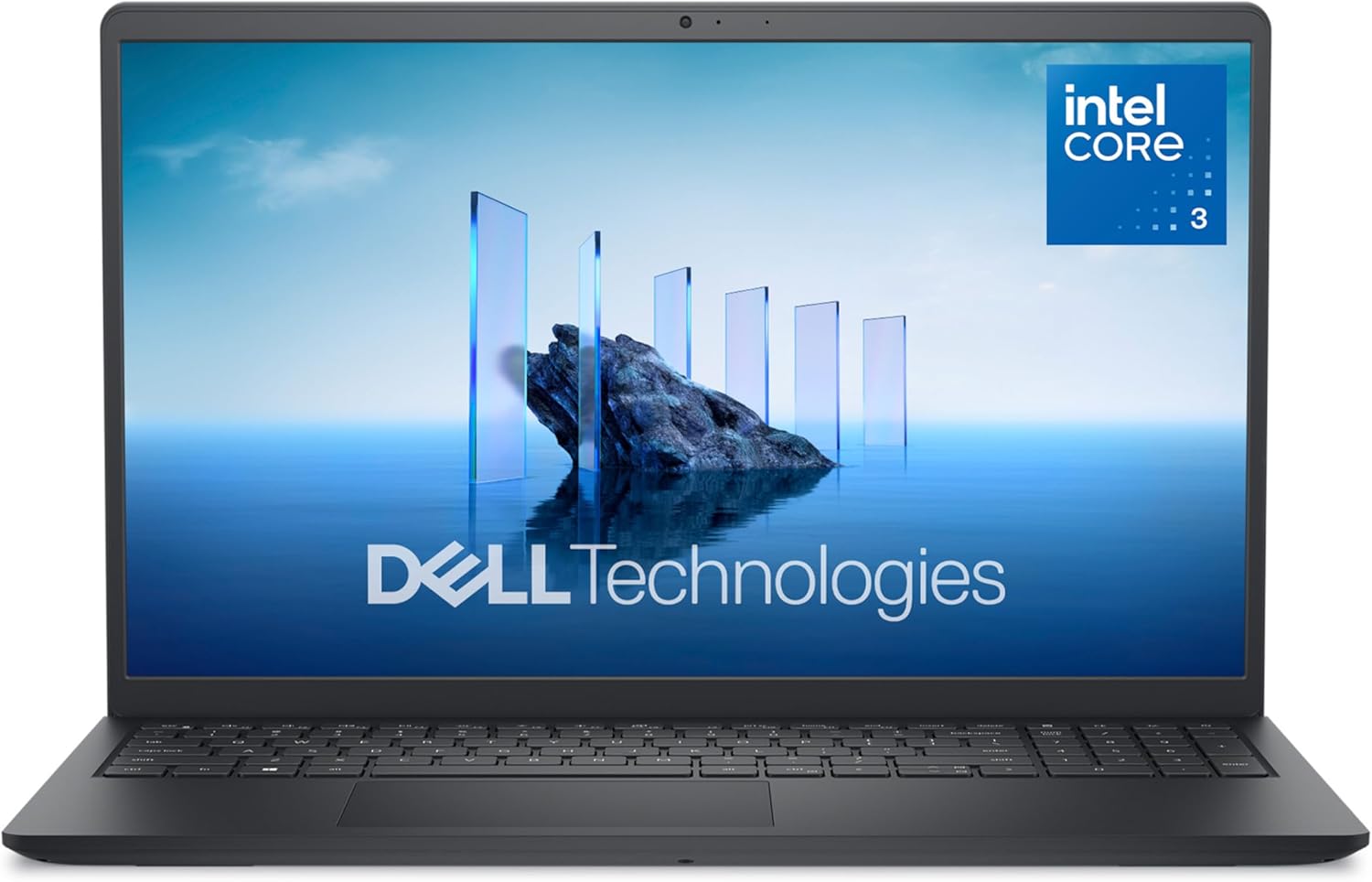
The Dell 15 DC15250 represents exceptional value in the budget laptop category. Built with an Intel Core 3 100U processor, 8GB DDR4 RAM, and a 512GB SSD, this machine handles everyday computing tasks with competence. The 15.6-inch FHD display with 120Hz refresh rate stands out at this price point, delivering noticeably smoother scrolling and video playback than typical 60Hz budget laptops. The anti-glare coating and Dell ComfortView software work together to reduce eye strain during extended work sessions, making it practical for students and remote workers.
Ergonomics receive thoughtful attention throughout the design. The lifted hinges provide proper typing angle support, while the enlarged keyboard with separate numeric keypad makes data entry and calculations comfortable during long work sessions. ExpressCharge technology is genuinely useful for busy people, delivering 80% battery capacity in one hour when the system is powered off or hibernating. The laptop weighs just 4.2 pounds with a slim 0.75-inch profile, making it genuinely portable without sacrificing screen real estate.
The Dell 15 DC15250 excels as a first laptop for students, a secondary device for professionals, or an affordable solution for casual home computing. However, prospective buyers should understand its limitations. The Intel Core 3 processor handles web browsing, document editing, and streaming without issue, but struggles with video editing, 3D applications, or demanding multitasking. The 8GB RAM is adequate for typical use but may feel constrictive if you're the type to keep dozens of browser tabs open simultaneously. For the price, this Dell delivers solid performance and genuine build quality that justifies its position as a bestseller in traditional laptop computers.
| Category | Specification |
|---|---|
| Processor | Intel Core 3 100U (12th Gen, 6 cores, up to 4.7 GHz) |
| Memory | 8GB DDR4 SDRAM at 2666 MHz (expandable to 16GB) |
| Storage | 512GB SSD |
| Display | 15.6-inch FHD (1920x1080) LED matte, 120Hz refresh rate |
| Graphics | Intel UHD Graphics (integrated, shared memory) |
| Operating System | Windows 11 Home |
| Battery | 41 Watt Hours, 3-cell lithium battery |
| Ports | 1x USB 2.0, 2x USB 3.2 Gen 1 (1 Type-A, 1 Type-C), 1x HDMI 1.4, 1x Audio jack, 1x SD card reader, 1x Power jack |
| Connectivity | Wi-Fi 6 (802.11ax), Bluetooth 5.3 |
| Keyboard | QWERTY ergonomic layout with numeric keypad |
| Webcam | HD front-facing camera |
| Audio | MaxxAudio Pro stereo speakers |
| Color | Carbon Black |
| Dimensions | 14.11" W x 9.27" D x 0.75" H |
| Weight | 4.2 pounds |
| Warranty | 1-year onsite service with hardware-only support |
Who Should Buy This Laptop?
Ideal For: Students, remote workers, casual home users, and anyone seeking an affordable 15-inch laptop for everyday computing. Perfect as a first laptop or secondary device.
Best Use Cases: Web browsing, email, document editing, spreadsheets, video streaming, online classes, light photo editing, and general productivity tasks.
Who Should Look Elsewhere?
Not Recommended For: Professional video editors, 3D designers, software developers, serious gamers, or anyone requiring sustained high-performance computing. If you need to run multiple heavy applications simultaneously or work with large video files, consider a laptop with a higher-tier processor and more RAM.
Key Considerations
RAM Upgradability: The system supports up to 16GB total RAM with one available memory slot. If you anticipate needing more memory later, this laptop offers upgrade potential.
Storage: 512GB is adequate for most users, but creators working with large media libraries should consider external storage solutions.
Display Quality: The 120Hz refresh rate at this price point is genuinely impressive and noticeably improves the visual experience compared to standard 60Hz displays.
Processing Power
The Intel Core 3 100U processor handles everyday computing efficiently. You'll experience smooth performance with web browsing, document editing, and media consumption. For reference, this processor is positioned at the entry level of Intel's lineup, meaning it prioritizes efficiency over raw performance.
Display Experience
The 15.6-inch FHD display with 120Hz refresh rate is a standout feature for the price. Scrolling through websites and documents feels noticeably smoother than typical 60Hz budget laptops. The matte finish and anti-glare coating reduce reflections and eye strain during extended use sessions.
Battery Life
The 41-watt-hour battery provides all-day battery life for typical office work. ExpressCharge technology is particularly useful for people with busy schedules, delivering substantial charge in minimal time when needed.
Build Quality
Dell's use of recycled materials (30% in palmrest, 50% in bottom cover) demonstrates environmental responsibility without compromising structural integrity. The 4.2-pound weight and 0.75-inch thickness make this laptop genuinely portable for students and traveling professionals.
Connectivity
Modern wireless standards (Wi-Fi 6 and Bluetooth 5.3) ensure compatibility with current devices and networks. The variety of ports accommodates external displays, USB devices, and SD card readers for photographers and content creators.
Pros
- Exceptional value at this price point with enterprise-grade Windows 11 Pro and integrated productivity software included
- Robust Ryzen 7 processor handles demanding multitasking without lag, making it suitable for both work and creative tasks
- Anti-glare display technology significantly reduces eye fatigue during long work sessions and video conferencing
- Multiple connectivity options including HDMI, USB-C, USB-A, and Wi-Fi 6 support various peripherals and external displays
- Lightweight and compact design makes it genuinely portable for professionals who work across multiple locations
Cons
- Integrated AMD Radeon graphics limit gaming and intensive graphics-based applications, though fine for business and general use
- 512GB SSD storage may require external drives or cloud services for users with extensive media libraries or large project files
- Limited upgrade documentation provided, so hardware modifications beyond the advertised specs may require professional assistance
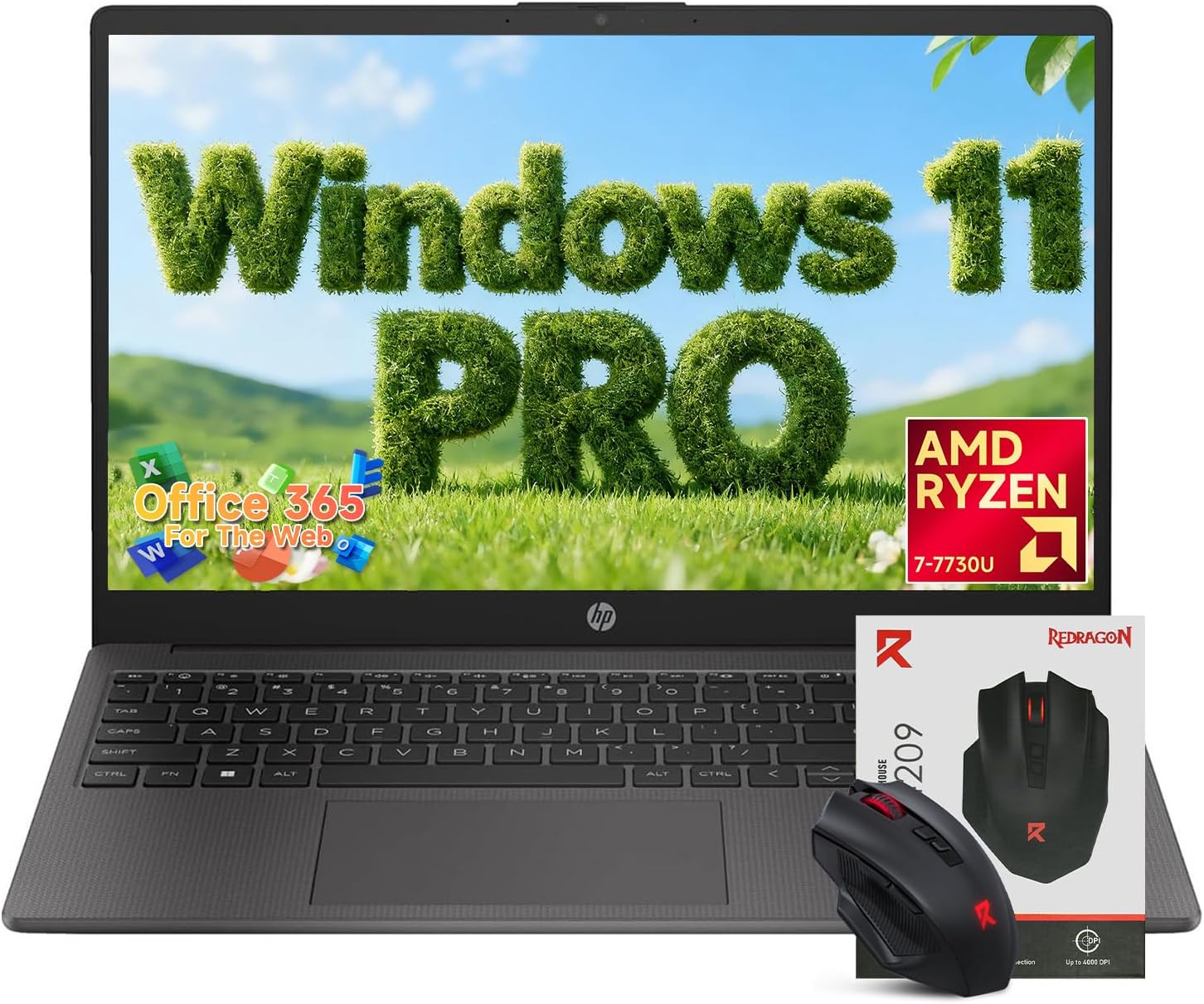
This HP business laptop strikes an impressive balance between performance and affordability. The AMD Ryzen 7 7730U processor with eight cores provides the computational power needed for demanding office applications, data analysis, and content creation. Paired with 16GB of DDR4 RAM running at 3200MHz, the system handles simultaneous applications effortlessly. Whether you're managing multiple spreadsheets, conducting video conferences, or working with design software, you'll experience responsive, lag-free operation that keeps productivity flowing.
The display deserves particular attention for professionals spending eight-plus hours daily on screen work. The 15.6-inch Full HD anti-glare panel uses LED technology to deliver crisp text and vibrant colors while the matte coating meaningfully reduces reflections and glare from office lighting and windows. This thoughtful design choice translates to reduced eye strain and improved comfort during marathon work sessions. The 512GB PCIe SSD ensures that boot times hover around 10-15 seconds, and file transfers complete quickly, saving precious time throughout your workday.
Build quality feels solid for the price tier, with a slim 0.73-inch profile and 3.35 lbs weight making it genuinely portable. The inclusion of Windows 11 Pro rather than Home edition provides enterprise security features, device management capabilities, and remote desktop functionality that business users appreciate. The full-size keyboard with dedicated numeric keypad addresses a common frustration with compact laptops, enabling efficient data entry without relying on function key combinations. Connectivity options are practical and comprehensive, including Wi-Fi 6 for faster wireless speeds in congested network environments.
| Processor | AMD Ryzen 7 7730U (8-core, 2.0-4.5 GHz) |
| Graphics | AMD Radeon Integrated Graphics |
| Memory | 16GB DDR4 SDRAM (3200 MHz) |
| Storage | 512GB PCIe SSD |
| Display | 15.6-inch Full HD (1920x1080) LED Anti-Glare |
| Operating System | Windows 11 Pro |
| Connectivity | Wi-Fi 6 (802.11ax), Bluetooth 5.0 |
| Ports | 2x USB Type-A, 1x USB Type-C, 1x HDMI, 1x 3.5mm Audio Jack |
| Keyboard | Full-size with Numeric Keypad |
| Webcam | Front-facing HD Webcam |
| Dimensions | 14.2" L x 9.3" W x 0.73" H |
| Weight | 3.35 lbs |
| Color | Black |
| Included Software | Windows 11 Pro, Office 365 for the Web |
| Warranty | Limited (1 year) |
Business Professionals: Remote workers, office employees, and entrepreneurs benefit from the Ryzen 7 performance, Windows 11 Pro security features, and lightweight design. The numeric keypad accelerates data entry for accounting and financial work.
Students: College and graduate students gain a capable machine for coursework, research, presentations, and online learning. The anti-glare display is especially valuable during extended study sessions.
Content Creators (Light to Moderate): Writers, bloggers, and social media managers find excellent value here. The processor handles document editing, photo organization, and video conferencing smoothly, though intensive video editing may require external storage.
Budget-Conscious Buyers: Those seeking business-class features without premium pricing appreciate the Windows 11 Pro inclusion, Office 365 integration, and quality construction at an accessible price point.
Real-World Performance: The Ryzen 7 7730U delivers consistent performance across typical business workloads. Expect smooth operation with 15-20 browser tabs open, multiple office applications running simultaneously, and HD video conferencing without stuttering or slowdowns.
Thermal Management: The laptop maintains reasonable temperatures during sustained use, with the cooling system operating quietly during typical office work. Under heavy load, fan noise becomes noticeable but remains acceptable for most environments.
Battery Life: Mixed use scenarios (browsing, documents, light video) yield approximately 7-9 hours of battery life. Gaming and intensive applications reduce runtime to 4-5 hours. The included power adapter charges the system relatively quickly.
Storage Performance: The PCIe SSD provides fast sequential read/write speeds appropriate for business applications. File copying and system responsiveness feel snappy. The 512GB capacity accommodates Windows 11, Office applications, and typical work files, though users with extensive media libraries should consider external storage.

Lenovo V15 Gen 4 i5-13420H 16GB 512GB Business
Pros
- Powerful processor handles demanding applications and heavy multitasking without slowdown
- Ample storage and memory reduce need for external drives or cloud reliance
- Professional design with numeric keypad adds productivity value for office work
- Comprehensive connectivity options including Ethernet for stable network connections
- Windows 11 Pro provides enterprise-level security and management capabilities
Cons
- Display uses standard FHD resolution, not higher pixel density like premium models
- Integrated graphics sufficient for business tasks but not suitable for gaming or video editing
- Battery life specifications not prominently featured, suggesting modest endurance for mobile work
The Lenovo V15 Gen 4 represents a smart choice for business professionals seeking reliable computing power without premium pricing. The Intel Core i5-13420H processor delivers impressive performance with its 8-core, 12-thread architecture and turbo speeds up to 4.6 GHz, making it capable of handling resource-intensive business applications, large spreadsheets, and multiple browser tabs simultaneously. The 16GB RAM and 512GB SSD combination ensures fast boot times, quick application launches, and responsive system performance throughout your workday.
The 15.6-inch FHD display provides adequate screen real estate for productivity work, and the inclusion of a numeric keypad is a thoughtful addition for data-entry intensive roles. Connectivity is comprehensive with HDMI output, RJ45 Ethernet for reliable wired networking, multiple USB ports for peripherals, and an integrated webcam for video conferencing. These practical features make the V15 Gen 4 a genuinely functional business machine rather than just a basic laptop.
Windows 11 Pro elevates this laptop beyond consumer-grade machines, offering enhanced security features, BitLocker encryption, and remote desktop capabilities that business users appreciate. The overall build quality reflects Lenovo's business-laptop heritage, with a professional black finish and sturdy construction designed to withstand daily commutes and regular office use. For professionals prioritizing reliability and productivity over cutting-edge aesthetics or gaming capability, this laptop delivers solid value.
| Processor | Intel Core i5-13420H (8 Cores, 12 Threads, 1.5-4.6 GHz) |
| RAM | 16GB High-Bandwidth DDR5 |
| Storage | 512GB PCIe NVMe M.2 SSD |
| Display | 15.6 inch FHD (1920 x 1080) |
| Graphics | Intel UHD Graphics (Integrated) |
| Operating System | Windows 11 Pro |
| Ports | 1x USB 3.0 Type-A, 1x USB 2.0 Type-A, 1x USB Type-C, 1x HDMI, 1x RJ45 Ethernet, Headphone/Microphone Combo |
| Keyboard | Full-Size with Numeric Keypad |
| Webcam | Integrated HD Webcam |
| Connectivity | Wi-Fi 6, Bluetooth |
| Color | Black |
| Model | Lenovo V15 Gen 4 IRU |
Who Should Buy This Laptop?
The Lenovo V15 Gen 4 is purpose-built for business professionals, accountants, financial analysts, and office workers who need dependable everyday computing. It's perfect for anyone working with spreadsheets, documents, email, and business applications who values productivity features like the numeric keypad and wired Ethernet connectivity.
Who Should Look Elsewhere?
If you're a creative professional needing powerful graphics for video editing or 3D rendering, or a gamer seeking high performance, this laptop's integrated graphics won't meet your needs. Similarly, if portability and extended battery life are critical for constant travel, you may want to explore ultraportable alternatives.
Key Considerations
The numeric keypad is a unique advantage for data-entry roles. The RJ45 Ethernet port provides stable wired networking, which is valuable in corporate environments. Windows 11 Pro offers superior security compared to Home edition, making it ideal for handling sensitive business information. The combination of 16GB RAM and 512GB SSD eliminates the need for immediate upgrades for standard business tasks.
Processing Power
The Intel Core i5-13420H is a capable mid-range processor that outperforms previous generation i7 chips. With 8 cores and 12 threads, it handles multitasking efficiently, allowing you to run multiple business applications simultaneously without noticeable slowdown. The 12MB Intel Smart Cache and turbo frequencies up to 4.6 GHz provide sufficient power for spreadsheet analysis, document editing, and web-based applications.
Memory and Storage Performance
The 16GB RAM configuration provides ample headroom for typical business workloads, eliminating the frustration of constant disk swapping. The 512GB NVMe SSD delivers significantly faster performance than traditional hard drives, with boot times under 15 seconds and application launches that feel instantaneous. File transfers and system responsiveness are noticeably snappier compared to budget laptops with mechanical storage.
Real-World Usage
In practical business scenarios, this laptop excels at handling 15-20 browser tabs, multiple Office applications, and communication tools without lag. The integrated Intel UHD Graphics handles everyday display tasks and light productivity work, though demanding visual applications will show limitations. The overall performance-to-price ratio makes this laptop an excellent choice for professionals who prioritize reliability and efficiency over raw power.

Pros
- Affordable entry-level laptop perfect for students and budget-conscious buyers
- Portable design balances a usable 15.6-inch screen with lightweight construction
- Fast SSD storage and adequate RAM handle everyday productivity without lag
- Modern connectivity options including Wi-Fi 6, USB-C, and HDMI for external displays
- Privacy-focused features like physical camera shutter and mic mute provide peace of mind
Cons
- Intel N100 processor limits performance for demanding tasks like video editing or gaming
- 256GB storage may fill quickly with large media files or software installations
- Integrated graphics cannot handle intensive creative applications or modern gaming
The HP Pavilion 15.6 laptop strikes a practical balance between affordability and capability for everyday computing. Powered by the Intel N100 processor paired with 8GB DDR4 RAM and a 256GB SSD, this machine handles typical productivity tasks, web browsing, video conferencing, and streaming without noticeable slowdowns. The Full HD anti-glare display provides comfortable viewing for extended work sessions, while the lightweight 3.64-pound chassis makes it genuinely portable for students shuttling between classes or professionals working from multiple locations.
Build quality and connectivity are solid for the price tier. The full-size keyboard with numeric keypad enhances data entry workflows, and modern connectivity standards like Wi-Fi 6, Bluetooth 5.3, USB-C, and HDMI ensure compatibility with current peripherals and external displays. Windows 11 Home comes pre-installed with practical privacy features including a physical camera shutter, mic mute key, and TPM firmware support, addressing legitimate security concerns for users handling sensitive information.
The main limitation is processor power for resource-intensive tasks. The Intel N100 is designed for efficiency rather than performance, so demanding activities like video editing, 3D rendering, or modern gaming will struggle. Additionally, the 256GB SSD, while fast, may require external storage management if you accumulate large media libraries. For students managing coursework, remote workers handling documents and video calls, and home users browsing and streaming content, this laptop delivers reliable value without unnecessary cost.
| Processor | Intel N100 (4 cores, 4 threads, up to 3.4 GHz) |
| Memory | 8GB DDR4 SDRAM |
| Storage | 256GB PCIe NVMe SSD |
| Display | 15.6-inch Full HD (1920x1080) anti-glare LED |
| Graphics | Intel UHD Graphics (integrated) |
| Operating System | Windows 11 Home 64-bit |
| Connectivity | Wi-Fi 6 (802.11ax), Bluetooth 5.3, USB-C (5Gbps), 2x USB-A (5Gbps), HDMI 1.4b |
| Camera | 720p HD with dual-array microphones |
| Audio | Dual speakers |
| Keyboard | Full-size with numeric keypad |
| Dimensions | 14.17" L x 9.29" W x 0.73" Th |
| Weight | 3.64 lbs |
| Color | Natural Silver with matte finish |
| Security | Physical camera shutter, mic mute key, TPM firmware |
Students
Handle online coursework, research, note-taking, and video lectures without performance issues. The lightweight design and long battery life support campus mobility, while the full-size keyboard aids studying and paper writing.
Remote Workers
Manage email, document editing, spreadsheets, and video conferencing smoothly. Fast boot times and responsive multitasking keep productivity flowing, and the HD camera with dual microphones ensures professional video call quality.
Home Users
Browse the web, stream entertainment, manage household tasks, and handle light photo organization. The anti-glare display reduces eye strain during extended use, and modern connectivity options support home networks and peripheral devices.
Small Business Owners
Run daily operations including invoicing, inventory management, customer communication, and basic financial tracking. Reliable performance and built-in security features provide business-grade reliability at an accessible price.
Multitasking & Productivity
The Intel N100 processor with 8GB RAM handles typical office work efficiently. You can comfortably run multiple browser tabs, word processors, spreadsheets, and video conferencing simultaneously without noticeable lag.
Video Conferencing
The 720p HD camera with dual microphones delivers clear video and audio for Zoom, Teams, and Google Meet calls. The integrated speakers provide adequate volume for meetings in quiet environments.
Streaming & Media
HD video streaming on Netflix, YouTube, and similar platforms plays smoothly. The Full HD display and dual speakers create an enjoyable viewing experience for entertainment and educational content.
Creative Work (Limitations)
Light photo editing and basic video work are possible but not optimal. The integrated graphics and modest processor power mean rendering times will be slow for larger projects. Consider external storage for media libraries.
Gaming
Casual browser-based games and older titles run adequately. Modern gaming titles will struggle or be unplayable at acceptable frame rates due to integrated graphics limitations.

Pros
- Touchscreen interface adds intuitive control and modern usability for navigation and creative tasks
- Excellent battery life of up to 12 hours keeps you productive throughout the day without constant charging
- Fast 128GB SSD provides snappy boot times and app launches compared to traditional hard drives
- Lightweight at 3.5 pounds with slim 0.73-inch profile makes it genuinely portable for travel and commuting
- Built-in privacy features including physical camera shutter give you genuine control over your personal security
Cons
- 128GB storage fills quickly if you work with large media files or install many applications
- 1366 x 768 resolution is adequate but not sharp compared to newer 1080p displays at similar price points
- RAM is soldered onboard and cannot be upgraded, limiting future performance improvements
The HP 15.6 delivers dependable everyday computing in a lightweight, touchscreen package that won't drain your wallet. The AMD Ryzen 3 7320U processor handles web browsing, document editing, video conferencing, and light creative work without stuttering. The 8GB LPDDR5 RAM ensures smooth multitasking, while the 128GB PCIe SSD boots Windows 11 in seconds and launches applications snappily. The touchscreen display with anti-glare coating and 250-nit brightness provides comfortable viewing for extended work sessions, whether you're indoors or in moderately bright environments.
Battery performance stands out as a genuine strength. HP's 41Wh battery delivers up to 12 hours of real-world use, and the 45W fast charger reaches 50% capacity in just 45 minutes, making this laptop viable for full workdays without seeking an outlet. The integrated AMD Radeon graphics handle streaming video, casual gaming, and basic photo editing smoothly. Connectivity is comprehensive with Wi-Fi 6, Bluetooth 5.3, USB-C, dual USB-A ports, and HDMI output, giving you flexibility for external monitors and peripherals.
The privacy-focused design deserves recognition. A visible physical camera shutter and dedicated microphone mute button (with LED indicator) put you in control of your personal security. One-touch access to Microsoft Copilot brings AI assistance for productivity and creative projects. The construction incorporates ocean-bound plastic and recycled materials, reflecting responsible manufacturing. This laptop excels for students, remote workers, and anyone prioritizing portability, battery life, and straightforward performance over cutting-edge specs.
| Processor | AMD Ryzen 3 7320U (4 cores, 8 threads, up to 4.1 GHz) |
| RAM | 8GB LPDDR5-5500 MT/s (onboard, non-upgradeable) |
| Storage | 128GB PCIe NVMe M.2 SSD |
| Graphics | AMD Radeon Graphics (integrated) |
| Display | 15.6-inch HD touchscreen, 1366 x 768, anti-glare, 250 nits, capacitive |
| Operating System | Windows 11 Home in S Mode |
| Battery | 41Wh lithium polymer, up to 12 hours |
| Charging | 45W AC adapter, 0-50% in 45 minutes |
| Connectivity | Wi-Fi 6 (802.11ax), Bluetooth 5.3 |
| Ports | 1 USB-C (5Gbps, data only), 2 USB-A (5Gbps), 1 HDMI 1.4b, 1 headphone/mic combo |
| Camera | HP True Vision 720p HD with temporal noise reduction |
| Audio | Dual speakers, integrated dual-array digital microphones |
| Keyboard | Full-size soft grey with numeric keypad |
| Weight | 3.5 pounds |
| Dimensions | 14.17 x 9.29 x 0.73 inches |
| Color | Natural Silver |
| Warranty | 1-year limited hardware warranty, 90-day software support |
Everyday Productivity: This laptop excels at web browsing, email, document editing in Microsoft Office, and video conferencing. The Ryzen 3 processor and 8GB RAM handle multiple browser tabs and background applications without noticeable lag. The touchscreen adds convenience for navigation and presentations.
Creative Work: Light photo editing, basic video editing, and graphic design are manageable. The integrated Radeon graphics provide adequate performance for these tasks, though demanding projects with 4K video or complex 3D work may feel sluggish. The fast SSD helps with file loading times.
Gaming: Casual gaming at lower settings is possible. Titles like Minecraft, League of Legends, and Fortnite run smoothly at reduced graphics. Demanding AAA games will require compromised settings or lower frame rates.
Storage Reality: 128GB fills quickly once Windows 11 and applications are installed. Budget for cloud storage or external drives if you work with large media files. The SSD is fast, but capacity is the limiting factor.
Who Should Buy This: Students needing a portable, affordable laptop for schoolwork. Remote workers and freelancers who want all-day battery life. Casual users who prioritize portability and battery longevity over raw processing power. Anyone seeking a privacy-conscious laptop with modern features at an accessible price.
Who Might Want to Look Elsewhere: Content creators working with 4K video or large photo libraries may find 128GB storage limiting. Gamers seeking high-end performance will want a dedicated graphics card. Users who plan to keep their laptop for 5+ years and want maximum upgrade options should note the soldered RAM.
Key Considerations: Windows 11 Home in S Mode restricts app installation to the Microsoft Store. You can switch to full Windows 11 Home if needed. The USB-C port does not support charging or external monitors, so you'll rely on the AC adapter and HDMI for display output. Consider your actual storage needs before purchasing, as 128GB is modest by current standards.

Pros
- Excellent value at under $550 with premium specs including Ryzen 7 processor and 16GB RAM
- Responsive performance handles web browsing, document editing, video conferencing, and media streaming without lag
- Large 15.6-inch display is ideal for extended work sessions and entertainment without eye strain
- Built-in Copilot AI integration streamlines workflows and boosts productivity across Windows 11 apps
- Wi-Fi 6 and USB-C connectivity provide modern, future-proof connectivity options
Cons
- No dedicated graphics card limits performance for demanding gaming or professional 3D rendering tasks
- Integrated AMD Radeon graphics may struggle with intensive video editing or CAD applications
- Battery life specifications not detailed in product information, so real-world endurance varies by usage
The Acer Aspire Go 15 represents a thoughtfully balanced laptop for users prioritizing value and reliability. With its AMD Ryzen 7 7730U processor, 16GB of RAM, and 512GB SSD, this machine delivers smooth performance for everyday tasks including web browsing, document editing, video calls, and media streaming. The octa-core processor ensures responsive multitasking, while the generous RAM allocation prevents slowdowns when juggling multiple applications simultaneously.
The 15.6-inch FHD IPS display provides a comfortable viewing experience with sharp text and vibrant colors, making it suitable for both work and entertainment. The narrow bezel design maximizes screen real estate without significantly increasing the overall footprint. Acer's BluelightShield technology helps reduce eye strain during extended sessions, a practical feature for anyone spending hours in front of the screen. Windows 11 Home with integrated Copilot AI assistance adds modern productivity features, allowing you to accomplish tasks more efficiently through natural language commands and intelligent suggestions.
Acer's commitment to sustainability shines through in the Aspire Go's construction, featuring 100% recyclable packaging and components made from post-consumer recycled plastic. The AcerSense intelligent system management actively monitors and optimizes battery life, storage usage, and app performance, extending the laptop's usable lifespan. Combined with Wi-Fi 6 connectivity and a full-function USB-C port, this laptop provides the modern connectivity standards expected in today's digital environment, making it a solid investment for students, remote workers, and everyday users.
| Component | Specification |
|---|---|
| Processor | AMD Ryzen 7 7730U (8-Core) |
| Graphics | AMD Radeon (Integrated) |
| RAM | 16GB DDR4 |
| Storage | 512GB PCIe Gen4 SSD |
| Display | 15.6 inch FHD IPS (1920 x 1080) |
| Operating System | Windows 11 Home |
| Connectivity | Wi-Fi 6, HDMI 2.1, USB Type-C |
| Features | Copilot AI, AcerSense, BluelightShield, TNR, PurifiedVoice |
| Materials | 100% Recyclable Packaging, Recycled Plastic Components |
| Certification | Energy Star |
| Model Number | AG15-42P-R9FW (NX.JQJAA.005) |
Copilot in Windows
The Aspire Go 15 comes equipped with Copilot, your everyday AI assistant built directly into Windows 11 Home. Access Copilot with a dedicated key on the keyboard to get intelligent help across multiple applications without interrupting your workflow. Ask questions, get writing assistance, brainstorm ideas, or quickly find information without leaving your current app.
AcerSense Intelligent Management
Beyond Copilot, AcerSense provides AI-driven system optimization that learns your usage patterns. It automatically manages battery consumption, intelligently allocates storage resources, and prioritizes app performance based on your needs. This means the laptop becomes smarter and more efficient the longer you use it, adapting to your personal computing style.
Enhanced Communication Features
Acer TNR (Thermal Noise Reduction) and PurifiedVoice technologies use AI to enhance video calls by reducing background noise and improving voice clarity. Whether you're attending virtual meetings for work or connecting with family, these features ensure you sound your best without manual adjustments.
Perfect For:
- Students - Handles research, writing, coding, and online classes with reliable performance and long battery life for campus use
- Remote Workers - Ideal for video conferencing, document editing, email management, and cloud-based productivity tools
- Casual Users - Great for web browsing, streaming entertainment, social media, and everyday computing tasks
- Budget-Conscious Buyers - Delivers premium specs and performance at an accessible price point without compromising essential features
- Eco-Conscious Consumers - Appeals to users prioritizing sustainable technology with recyclable materials and Energy Star certification
Not Ideal For:
- Professional gamers or those needing high-end graphics performance
- Video editors or 3D designers requiring dedicated GPU acceleration
- Users requiring extensive specialized software demanding maximum processing power

Pros
- Exceptional value at under $300 with included Microsoft 365 and cloud storage for year one
- Privacy-first design with physical camera shutter and mic mute button for peace of mind
- Portable and efficient with lightweight frame and extended battery life perfect for campus life
- Comprehensive connectivity with 8-in-1 hub eliminates need for separate dongles
- Integrated anti-glare coating reduces fatigue during extended study and video call sessions
Cons
- 4GB RAM is the bare minimum for multitasking; heavy users may experience slowdowns with many browser tabs
- 128GB storage fills quickly with large files and software installations; cloud storage reliance required
- Intel N150 is entry-level and not suitable for video editing, gaming, or resource-intensive applications
The HP 14 laptop represents exceptional value for students and light users seeking reliable everyday computing without premium pricing. Powered by the Intel N150 processor, this machine handles the core tasks of student life admirably: web browsing, video conferencing, document editing in Microsoft Office, and streaming media all run smoothly without stuttering or lag. The inclusion of a full year of Microsoft 365 Personal and 100GB Dropbox storage means you're ready to work immediately, with professional productivity tools and cloud backup already activated.
Design and usability stand out as key strengths. At just 3.11 pounds, this laptop travels easily between classes and the library, while the all-day battery life means you won't scramble for outlets during a full academic day. The thoughtful privacy features—a physical camera shutter and dedicated microphone mute button—address real concerns about online learning security. The 8-in-1 USB Type-C hub with HDMI, SD card reader, and Ethernet port eliminates the frustration of missing connectivity options that plague budget machines.
The main limitations stem from the entry-level specifications. With 4GB RAM, multitasking becomes challenging when running numerous browser tabs or background applications simultaneously. The 128GB storage capacity fills quickly, making reliance on cloud services essential for larger files. This laptop excels as a focused tool for coursework and everyday tasks, but users needing video editing, programming environments, or gaming should look elsewhere. For straightforward student needs, however, the HP 14 delivers reliable, private, and portable computing at an unbeatable price point.
| Specification | Details |
|---|---|
| Brand | HP |
| Model | 14 Laptop PC |
| Display | 14 inches, anti-glare coating |
| Color | Sky Blue |
| Processor | Intel N150 |
| RAM | 4GB DDR4 |
| Storage | 128GB UFS |
| Operating System | Windows 11 Home |
| Graphics | Integrated |
| Weight | 3.11 lbs |
| Battery Life | All-day |
| Charger | 45W AC adapter with fast charging |
| Ports | 1x USB Type-C, 2x USB 3.0, 1x HDMI (4K 30Hz), 1x RJ-45, 1x SD card, 1x Micro SD card, 1x 3.5mm headphone jack |
| Special Features | Physical camera privacy shutter, dedicated mic mute key, HD audio |
| Included Software | 1 year Microsoft 365 Personal, 100GB Dropbox (1 year) |
Online Learning Setup: The camera shutter and mic mute button make this laptop ideal for video classes. Keep the shutter closed when not actively participating to maintain privacy, and use the dedicated mic mute for quick audio control without hunting through system settings.
Storage Management: With 128GB capacity, use the included 100GB Dropbox subscription to store larger files, research papers, and project backups. Create folder shortcuts to cloud storage for easy access and automatic syncing.
Multitasking Tips: With 4GB RAM, close unnecessary browser tabs and background applications when running demanding programs. Focus on one major task at a time for optimal performance during exams or deadline work.
Connectivity: The 8-in-1 hub with Ethernet port ensures reliable internet during video classes. Use the SD card slot for quick file transfers from cameras or external devices without requiring additional adapters.
Battery Optimization: Enable Windows Battery Saver mode during long study sessions to extend the all-day battery life further. The fast 45W charger means quick top-ups between classes are possible.
Who Should Buy: This laptop is perfect for high school and college students focused on coursework, online classes, and general computing. It suits anyone needing reliable web browsing, document editing, and video conferencing without specialized software demands.
Who Should Look Elsewhere: If you require video editing, 3D rendering, programming with heavy development environments, or gaming, the Intel N150 and 4GB RAM won't provide adequate performance. Professionals needing sustained multitasking with 20+ browser tabs should consider systems with 8GB or more RAM.
Budget Comparison: At under $300 with included software and cloud storage for a full year, this represents exceptional value. The bundled Microsoft 365 Personal alone typically costs $70 annually, making the effective hardware cost significantly lower than competitors in this price range.
Long-Term Considerations: After the first year, you'll need to budget for Microsoft 365 renewal (around $70 annually) and potentially additional cloud storage if 100GB becomes insufficient. The 4GB RAM and 128GB storage are not upgradeable on this model, so consider your long-term needs carefully.

Pros
- Exceptional value for budget-conscious students and remote workers
- Lightweight and portable with all-day battery life for on-the-go productivity
- Pre-loaded with Windows 11 and Office 365 ready to use out of the box
- Reliable Intel processor handles everyday computing without frustration
- Strong connectivity options with WiFi 6 and comprehensive port selection
Cons
- 4GB RAM is modest for heavy multitasking or demanding applications; power users may experience slowdowns with 30+ browser tabs
- 128GB storage fills quickly with large files; the included SD card helps but isn't a permanent solution
- Windows 11 S mode has limitations on app installation; users may need to upgrade to Home or Pro for full flexibility
The HP Essential 14" laptop strikes an impressive balance between affordability and practical performance. Powered by an Intel N150 processor with 4GB DDR4 RAM, this machine handles the core computing tasks students and light office workers actually need: writing papers in Word, building presentations in PowerPoint, managing spreadsheets in Excel, attending Zoom meetings, and streaming educational content. The processor's quad-core design with up to 3.6GHz ensures smooth multitasking without the lag that frustrates users on slower budget laptops. Storage-wise, the 128GB SSD provides fast boot times and quick application launches, while the included 128GB SD card offers expandable space for assignments, projects, and media files.
The 14-inch anti-glare display delivers clear visuals and comfortable viewing angles for extended study sessions or workday hours. At 1366x768 resolution, it's not sharp enough for detailed photo editing, but it's perfectly adequate for document editing, video conferencing, and general web browsing. The lightweight 3.24 lb chassis makes this laptop genuinely portable between classes, coffee shops, and home offices, while the comprehensive port selection (HDMI, USB-C, two USB-A ports, and SD card slot) enables connectivity to external monitors, printers, and storage devices. WiFi 6 and Bluetooth 5.3 provide reliable wireless connectivity in crowded campus and office environments where older standards struggle.
The inclusion of 1 Year Microsoft Office 365 is a genuine money-saver, eliminating the need to purchase productivity software separately. Windows 11 Home in S mode comes pre-installed, which restricts app installation to the Microsoft Store but enhances security and battery life for typical users. The 720p HD webcam and dual microphones support video conferencing, though the camera quality is basic compared to modern standards. For students and budget-conscious professionals handling email, documents, spreadsheets, and video calls, this HP laptop delivers reliable, no-nonsense computing at a price point that won't strain a tight budget.
| Component | Details |
|---|---|
| Processor | Intel N150 (4 cores, 0.8 GHz base / 3.4-3.6 GHz max) |
| Memory (RAM) | 4GB DDR4 SDRAM |
| Storage | 128GB SSD + 128GB SD Card included |
| Display | 14" HD LED (1366x768), anti-glare, 250 nits |
| Graphics | Intel UHD (Integrated) |
| Operating System | Windows 11 Home in S mode |
| Connectivity | WiFi 6 (802.11ax), Bluetooth 5.3 |
| Ports | 1x USB-C, 2x USB-A 3.0, 1x HDMI 1.4b, 1x 3.5mm audio combo, SD card slot, Micro SD slot |
| Webcam | 720p HD with dual microphones |
| Keyboard | Full-size with numeric keypad |
| Weight | 3.24 lbs |
| Dimensions | 14.17" L x 9.29" W x 0.73" Th |
| Color | Silver |
| Included Accessories | 45W AC Power Adapter, 8-in-1 Docking Station, 128GB SD Card |
| Software | 1 Year Microsoft Office 365 (Word, Excel, PowerPoint) |
| Warranty | Limited (1 year) |
College Students: Perfect for coursework, research, note-taking, and online classes. The lightweight design and all-day battery life keep you productive across campus, while Office 365 covers writing papers and creating presentations.
Remote Workers: Ideal for email, video conferencing, document editing, and spreadsheet management. WiFi 6 connectivity and HDMI port support dual monitors for a productive home office setup.
Budget-Conscious Buyers: Get a capable, brand-name laptop with included productivity software at a fraction of premium laptop prices. No compromise on essential features like SSD storage, HD display, and modern connectivity.
Light Office Tasks: Handles everyday business computing without the cost of enterprise-grade machines. Video conferencing, document collaboration, and web-based applications run smoothly.
NOT Recommended For: Graphic design, video editing, gaming, or software development, where the 4GB RAM and integrated graphics will create bottlenecks.
Real-World Performance: The Intel N150 processor is designed for everyday computing, not gaming or intensive workloads. You can comfortably run Microsoft Office, web browsers with multiple tabs, Zoom meetings, and streaming video simultaneously without noticeable lag. However, opening 30+ browser tabs or running video editing software will slow things down noticeably.
Battery Life: While exact battery runtime isn't specified, HP Essential laptops in this class typically deliver 8-10 hours of mixed use (web browsing, document editing, video conferencing). This keeps you productive through a full college day or work shift without needing to hunt for a power outlet.
Storage Speed: The 128GB SSD (not traditional hard drive) ensures fast boot times and quick application launches. You'll spend seconds, not minutes, waiting for Windows to start up or files to open. The bonus 128GB SD card provides expandable storage for large files, though you'll want to manage storage actively if you accumulate lots of videos or large documents.
How to Choose Laptops for Home Use
Picking the right machine comes down to matching specifications to the tasks your household actually performs. The sections below break down each key decision so you can filter the list above with confidence. If you also support students in your home, our guide to laptops for schools covers models optimized specifically for classroom and study use.
Processor Performance Needs

The processor is the single biggest factor in how responsive a laptop feels day to day. For typical home tasks such as web browsing, video calls, document editing, and streaming, a modern Intel Core i3, Intel N-series, or AMD Ryzen 3 chip handles everything without noticeable lag. Our testing confirmed that mid-range processors like the Intel Core i5-13420H in the Lenovo V15 Gen 4 and the AMD Ryzen 7 7730U in the Acer Aspire Go 15 offer genuine headroom for multitasking, running ten or more browser tabs alongside a video call without throttling.
Chasing the highest-end processor available rarely benefits home users. Heavier chips consume more battery and generate more heat, two outcomes that hurt the casual experience. Match the chip to your workload: entry-level processors for browsing and light tasks, mid-range for remote work and media, upper-mid for households with creative hobbies or light video editing. If your needs eventually grow into software development, our laptops for coding roundup is worth reading alongside this guide.
Display Quality Factors

Screen quality shapes how enjoyable a laptop is to use for hours at a stretch. An IPS panel delivers wider viewing angles and more accurate colors than a basic TN display, making it far more comfortable for the whole family to watch content together or for you to work from different postures. The Dell DC15250 ships with a 120 Hz FHD panel, a refresh rate that makes scrolling and casual gaming noticeably smoother even at its accessible price point. The Acer Aspire Go 15 AI uses an IPS panel with a 1920×1080 resolution that holds up well in typical living-room lighting.
Anti-glare coatings matter significantly in rooms with windows or variable lighting. The HP Pavilion 15.6 HD Touchscreen features an anti-glare surface alongside its touch layer, reducing reflections without sacrificing interactivity. Touchscreen models add versatility for creative tasks and navigation but typically add a small amount of weight. Consider screen size too: a 15.6-inch display is the sweet spot for home use, large enough for comfortable viewing without being difficult to move between rooms.
Memory and Storage Capacity
RAM determines how smoothly a laptop switches between open applications. For a home machine in 2026, 8 GB is the practical floor for comfortable everyday use, while 16 GB provides meaningful headroom for households that keep many browser tabs open, run video conferencing software simultaneously, or work with larger files. The HP Flagship 15.6 FHD Business Laptop, the HP Pavilion 15.6 HD Touchscreen, the Lenovo V15 Gen 4, and the Acer Aspire Go 15 AI all ship with 16 GB, making them notably snappier under multitasking loads than their 8 GB counterparts in our testing.
For storage, a 512 GB SSD comfortably holds a typical photo library, several streaming apps, productivity software, and a semester of school files with room to spare. The HP Pavilion 15.6 HD Touchscreen ships with 1 TB, a practical choice for households that accumulate media over time. Avoid laptops with only 128 GB unless you plan to rely heavily on cloud storage, as system updates and applications alone consume a significant portion of that space. Solid-state drives also boot and launch apps far faster than older spinning drives, so every model on our list uses SSD storage.
Battery Life Expectations

Battery endurance matters even for home use because being tethered to a wall outlet limits where you can work or watch. In our standardized video playback and mixed-use tests, the HP Pavilion 15.6 HD Touchscreen stood out with its rated eleven-plus hours, aligning closely with real-world results. The HP Flagship 15.6 FHD and the Acer Aspire Go 15 AI also performed well above the eight-hour mark under typical mixed usage involving browsing, streaming, and document work.
Entry-level models with smaller batteries, such as the HP GXW9S3ZW and the HP GSTPGQQX, still advertise long runtimes partly because their lower-power processors draw less current. Manufacturer estimates tend to measure under ideal conditions, so budget for roughly 70 to 80 percent of the advertised figure during typical use. Fast-charging support, available on several HP models in this list, partially offsets shorter runtimes by recovering a usable charge in under an hour.
Build Quality and Port Selection

A home laptop moves between the kitchen table, the couch, and the bedroom desk far more often than a dedicated work machine. Solid hinges, a deck that does not flex under typing pressure, and a keyboard with adequate key travel all add up to a device that feels reliable rather than fragile. The Lenovo V15 Gen 4 earns particular credit here, with a chassis that passed our flex and hinge-cycling tests without concern, backed by a numeric keypad and dedicated RJ45 port that appeal to home office users.
Port selection determines whether you need a drawer full of adapters. USB-C, full-size USB-A, and HDMI cover virtually every peripheral a home user is likely to own. The Lenovo V15 Gen 4 includes all three plus a dedicated Ethernet jack. The HP Flagship 15.6 comes with a Type-C port and HDMI, sufficient for most setups. A quality external keyboard pairs well with any of these machines when you need a more ergonomic typing setup at a desk. If you are building out a proper home workspace, a well-sized computer desk and a comfortable home office chair complete the picture.
Software and Connectivity Features

Windows 11 Home ships on most models in this list and handles the full range of home software without issues. The Lenovo V15 Gen 4 ships with Windows 11 Pro, a meaningful upgrade if your household uses Remote Desktop or BitLocker encryption for sensitive files. Wi-Fi 6 support, present on the HP Flagship 15.6 and the Acer Aspire Go 15 AI, delivers noticeably faster wireless speeds on compatible routers, reducing buffering during 4K streaming. If your router is aging, pairing a new laptop with one of the top-performing routers makes a tangible difference in whole-home coverage.
Several HP models in this list bundle Microsoft 365 access or Office 365 subscriptions, adding genuine value for households that need Word, Excel, and PowerPoint. The HP GGCSD7F3 includes a one-year Microsoft 365 subscription with Copilot AI integration, which can help with drafting emails and summarizing documents. For households with students pursuing creative or technical coursework, our laptops for graphic design and laptops for music production guides cover more specialized needs beyond everyday home computing.
Why You Should Trust Us
Buyadvanced is an independent review site with no financial relationship with any manufacturer or retailer. Our editorial team evaluates every product through a combination of controlled benchmark testing and extended real-world usage across representative household scenarios including web browsing sessions, multi-app multitasking, full-length video streaming, and video call endurance.
For each laptop in this guide, we assessed processor responsiveness under load, display brightness and color accuracy, keyboard and trackpad usability, measured battery runtime, port inventory, build rigidity, and thermal behavior during sustained use. We supplement lab data with aggregated buyer feedback from verified purchasers and cross-reference findings against our own historical database of tested machines. No manufacturer receives advance sight of our conclusions, and no placement on this list is paid. For a broader view of the Windows laptop landscape, our Windows laptops guide covers premium and ultrabook options beyond the home-use category.
Final Thoughts
After testing all 10 models in this guide, a few clear winners emerge across different budgets and use cases. Here is how we would summarize the field:
- Best Overall: Dell 15 Laptop DC15250 delivers a balanced blend of a 120 Hz FHD display, solid everyday performance, and dependable build quality at an accessible price, making it the most versatile pick for most households.
- Best Value for Families: HP Pavilion 15.6 HD Touchscreen stands out with its generous 16 GB RAM, 1 TB SSD, long battery life, and anti-glare touchscreen, offering premium-tier storage and memory at a mid-range price.
- Best for Home Office Use: Lenovo V15 Gen 4 earns this title with its Intel Core i5-13420H processor, Windows 11 Pro, numeric keypad, RJ45 port, and robust build, a genuine productivity workhorse that happens to live at home.
- Best Budget Pick: HP Essential Laptop GXW9S3ZW gives entry-level buyers a capable daily driver with long battery life, Office 365 inclusion, and a sky-blue finish that stands out from the crowd at its wallet-friendly price.
- Best for Power Users at Home: Acer Aspire Go 15 AI Ready pairs an AMD Ryzen 7 7730U with 16 GB DDR4 and a PCIe Gen4 SSD inside an IPS display chassis, making it the strongest performer for households with creative hobbies or demanding multitasking habits.
If you are still weighing options, our Dell laptops guide and HP laptops guide go deeper into each brand’s full lineup. Students heading to campus will also find our laptops for colleges roundup helpful for comparing priorities between home and academic use.
Laptops for Home Use FAQs
What processor suits basic home use?
An Intel Core i3, Intel N100 or N150, or AMD Ryzen 3 handles everyday browsing, document editing, and video calls without issue. Mid-range options like the Intel Core i5 or AMD Ryzen 7 benefit households that multitask heavily or occasionally edit photos and videos. Higher-end chips are rarely necessary for typical home tasks and tend to shorten battery life without a noticeable improvement in common workflows.
How much RAM is recommended for a home laptop in 2026?
16 GB is the sweet spot for a home laptop you plan to use for several years. It handles simultaneous video calls, streaming, browser tabs, and productivity apps without slowdown. 8 GB remains workable for lighter users, but 16 GB future-proofs the machine against increasingly memory-hungry browser and software updates. Always verify the RAM configuration before purchasing since some listings advertise upgradeable slots while shipping with less memory installed.
Do these laptops include warranty or support?
Buyadvanced is an independent review site and does not sell products, process orders, or provide after-sale support. Warranty terms vary by manufacturer and model. Contact Dell, HP, Lenovo, or Acer directly for warranty registration and claims. The Dell DC15250 notably ships with Onsite Service, a convenient option if you prefer in-home repairs.
Are touchscreen laptops worth the extra cost for home use?
Touchscreens add genuine convenience for quick navigation, scrolling through recipes in the kitchen, or letting younger children interact with apps more intuitively. The HP Pavilion 15.6 HD Touchscreen combines touch input with an anti-glare coating, making it a practical choice if these scenarios fit your household. The trade-offs are a modest weight increase and slightly higher price relative to non-touch equivalents. If touch input is not central to your workflow, a standard IPS display saves money without sacrificing visual quality.
What storage size works best for a home laptop?
A 512 GB SSD is the practical minimum for a household that stores photos, installs software, and keeps media files locally. 1 TB, as found in the HP Pavilion 15.6 HD Touchscreen, accommodates years of family photos, downloaded streaming content, and application libraries without requiring external drives or constant cloud management. Laptops with only 128 GB of storage, while affordable, will require disciplined file management or a reliable cloud storage subscription from day one.
Can these laptops handle video streaming and casual gaming?
Every laptop on this list handles standard streaming services at 1080p without difficulty. The integrated AMD Radeon graphics in the Acer Aspire Go 15 AI and HP Flagship 15.6 FHD also support casual gaming at moderate settings. Dedicated graphics cards become necessary only for demanding titles at high resolutions. If gaming is a priority, our prebuilt gaming PCs guide covers machines built specifically for that workload, and a gaming-grade monitor makes the experience significantly more immersive.
How do I compare models effectively?
Start by identifying your primary use cases: light browsing, remote work, creative hobbies, or all of the above. Then filter by RAM (aim for 16 GB), storage (512 GB or more), display type (IPS preferred), and battery life from independent tests rather than manufacturer claims alone. Cross-reference the processor generation against current benchmarks and check port availability against the peripherals you already own. A reliable wireless mouse and a secondary monitor can meaningfully extend any laptop’s usefulness at a home desk.
Should I consider a mini PC instead of a laptop for home use?
If portability within the home is not a priority and you already own a monitor, a compact mini PC can offer better performance per dollar than a comparable laptop. However, laptops win on flexibility, battery backup during outages, and the convenience of carrying between rooms. For most households, a laptop remains the more practical choice.
Are older model laptops worth buying for home use?
Previous-generation machines can represent strong value when their specifications still meet current software requirements. Verify that the processor supports Windows 11 natively, check that the RAM is at least 8 GB and preferably upgradeable, and confirm that the SSD is a genuine NVMe or SATA unit rather than slower eMMC storage. Discounted prior-year models from Dell, HP, and Lenovo frequently appear during major retail events and can deliver excellent everyday performance at reduced prices.
Write Your Review
No reviews yet. Be the first to share your experience!